Template-Based WordPress Provisioning: Give Every Customer a Ready-to-Use Site on Signup

A new customer signs up, pays, and lands in the dashboard. What do they see? If the answer is an empty WordPress install with the default theme and a “Hello world” post, you have a churn problem waiting to happen. Template-based WordPress provisioning fixes this by handing every customer a finished starter site at the exact moment they sign up.
This guide walks through how a template catalog plus clone-on-signup provisioning works in GrabWP Tenancy WaaS, and how to operate it from a handful of templates to a large catalog.
The Problem With Blank-WordPress Onboarding
Blank onboarding puts all the setup work on the customer. They have to choose a theme, build pages, configure a menu, add sample content, and figure out where everything lives before they ever see value. Most people never finish. They signed up to get a working site, not to spend an afternoon assembling one.
Blank installs also make your product look unfinished. A first impression of “Hello world” and a default theme signals that the hard part is still ahead. That gap between paying and seeing something real is where trials go cold and refunds get requested.
The fix is to remove the assembly step entirely. Instead of shipping an empty install and hoping the customer builds something, you ship a finished site and let them edit it. That is what provisioning templates make possible.
What a Provisioning Template Is
A provisioning template is a real, fully built tenant that you designate as a source to copy from. It has its pages, posts, theme settings, menus, media, and configuration already in place. When a customer picks it, the platform makes an exact copy into their own isolated tenant.
Under the hood, the clone (from GrabWP Tenancy) copies the template tenant’s database tables and its uploads directory into the new tenant, performs automatic URL replacement so links and media point at the new site, and skips symlinks so shared assets are not duplicated. The result is a self-contained starter site that belongs entirely to the new customer.
Because GrabWP delivers multi-tenancy without Multisite, each tenant is isolated with its own tables and uploads. A cloned template is not a shared blueprint the customer references; it is their own copy that they can edit freely without affecting the template or any other tenant.
Building Your Template Catalog
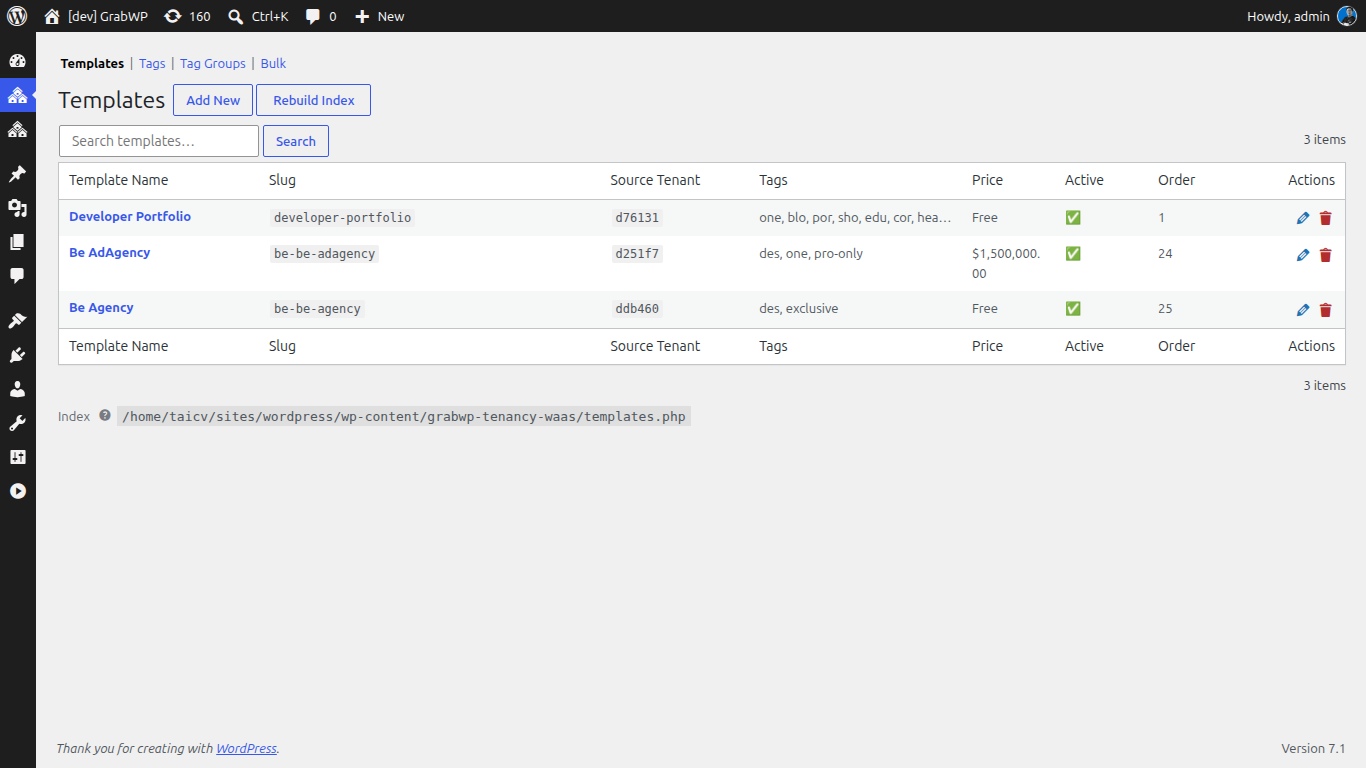
Templates are managed in the platform admin. Each template record carries the fields that control how it appears and who can use it: name, slug, category, tags, a per-plan availability list (allowed_plans), price and discount price, an active flag, sort order, description, and a thumbnail URL.
For anything beyond a few templates, use the Bulk page. It supports CSV import from either an uploaded file or pasted text, plus CSV download so you can export the current catalog, edit it in a spreadsheet, and re-import.
The canonical CSV columns are:
tenant_id, name, slug, category, tags, allowed_plans, price, discount_price, is_active, sort_order, description, thumbnail_url
A header row is required, but column order is free and unknown columns are ignored, so you can keep extra notes in your spreadsheet without breaking the import. Import options let you overwrite existing templates by tenant_id, and choose whether to skip or auto-create unknown tag slugs. Unknown plan IDs are dropped rather than causing an error. Every run reports per-run counts so you know exactly what happened: imported, updated, skipped, invalid, orphan, tags created or dropped, and plans dropped.
How Clone-on-Signup Provisioning Works
The signup wizard includes a template browser. During signup the customer sees the catalog, filtered to the templates their chosen plan is allowed to use, and picks one. That selection drives the whole provisioning step.
When they complete signup, provisioning clones the chosen template tenant into the new customer tenant automatically. There is no manual admin action, no ticket, and no waiting. The customer finishes checkout and their finished starter site is already live in their own isolated tenant.
The template browser supports pagination and is backed by a REST templates controller, so a growing catalog stays fast and usable inside the wizard. If you want to surface the same catalog outside the signup flow, the [grabwp_waas_templates] shortcode renders a catalog browser on any page.
Mapping Templates to Plan Tiers
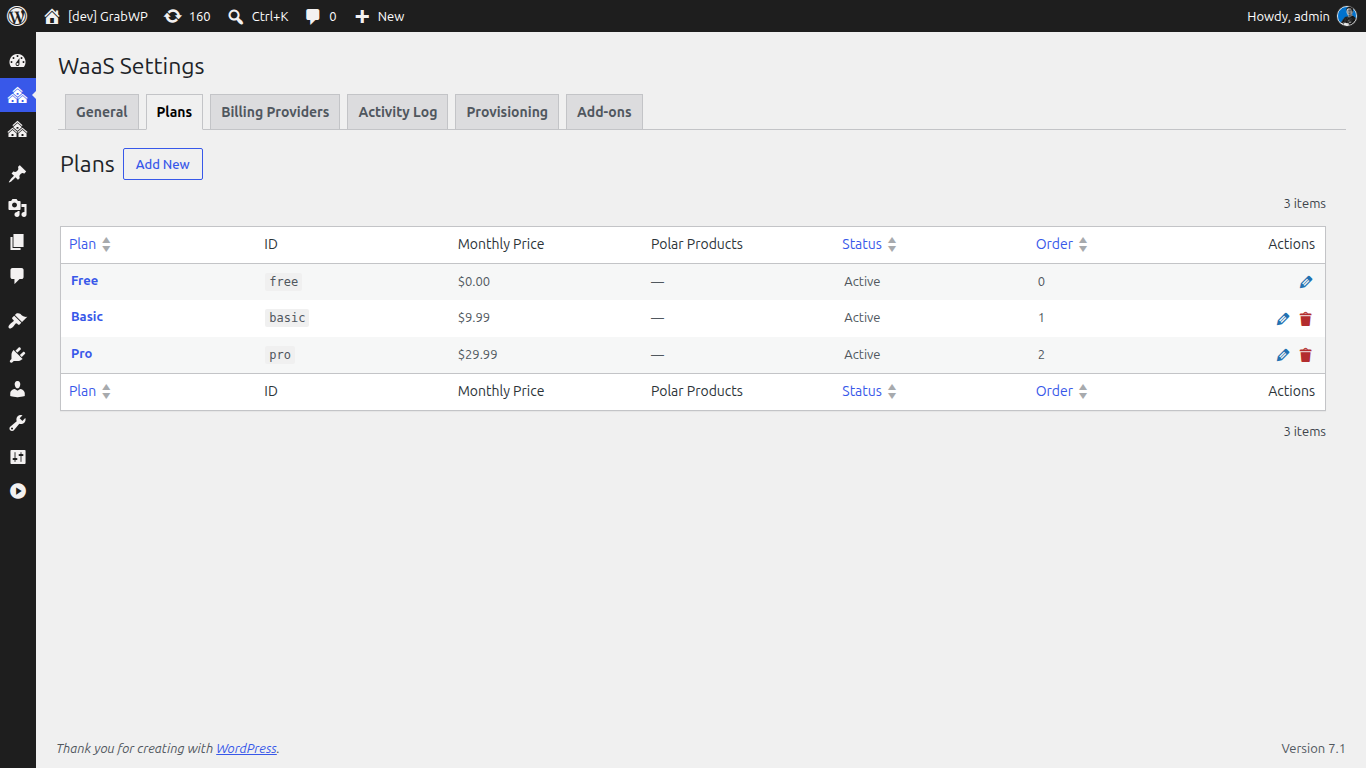
The allowed_plans field is where templates meet pricing. Because each template declares which plans can use it, you control exactly what each tier sees in the browser.
A common structure looks like this:
- Starter tier: a small set of clean, general-purpose templates so new customers get moving fast.
- Pro tier ($9.99/month): the full library, including niche and premium designs.
- Category gating: use
allowed_plansto reserve industry-specific templates (booking sites, storefronts, portfolios) for the plans that target those customers.
Since unknown plan IDs are dropped on import, you can prepare a CSV with your full plan mapping and trust that only valid assignments take effect. That makes it safe to iterate on your tiers without breaking the catalog.
Operating the Catalog at Scale
A catalog is a living thing. New templates get added, seasonal designs get retired, and plan mappings shift as your pricing evolves. The export-edit-reimport loop keeps this manageable: download the current catalog as CSV, make bulk changes in a spreadsheet, and re-import with overwrite-by-tenant_id enabled to apply everything at once.
The per-run counts are your audit trail. If you expected 40 updates and see 38 updated plus 2 invalid, you know two rows need attention before anyone notices. Use the active flag and sort order to curate what appears first without deleting anything, and lean on tags and categories so the browser stays navigable as the library grows.
The goal never changes: every customer, on every plan, gets a finished site the moment they sign up.
Get Started
Template-based provisioning turns signup from the start of a chore into the delivery of a finished product. Build your catalog, map templates to plans, and let clone-on-signup do the rest.
Ready to build it? Explore GrabWP Tenancy WaaS, see how the pieces fit together in our guide on building a WordPress SaaS with no code, or start with the free GrabWP Tenancy plugin.
Tác giả
GrabWP Team
WordPress Multi-Tenancy Experts
The GrabWP team builds and maintains the GrabWP Tenancy plugin, helping developers and agencies run scalable multi-tenant WordPress platforms. With years of experience in WordPress core, hosting infrastructure, and plugin development.
Câu hỏi thường gặp
- What is template-based WordPress provisioning?
- It is a signup flow where each new customer picks a template from a catalog and the platform clones that template tenant into a brand new customer tenant automatically. The customer lands on a finished starter site with pages, content, and settings already in place instead of a blank WordPress install.
- Do I need WordPress Multisite to run template provisioning?
- No. GrabWP Tenancy WaaS delivers multi-tenancy without Multisite. Each customer gets an isolated tenant with its own database tables and uploads directory, and provisioning clones a chosen template tenant into that new tenant on signup.
- Can different plans offer different templates?
- Yes. Every template carries a per-plan availability setting (allowed_plans), so a starter tier can see a small set of templates while higher tiers unlock premium designs. Plan IDs that do not exist are simply dropped during import.
Editorial standards: Our content is written by WordPress experts with hands-on multi-tenancy experience. Articles are fact-checked and regularly updated to ensure accuracy.