Real WordPress Client Isolation for Agencies, Without Multisite

Agencies reach for WordPress Multisite because it promises one place to run many client sites. Then the isolation problem shows up. A client asks where their data lives and who else can touch it. A plugin that works for one client breaks another. A single site needs a restore, and there is no clean way to roll back just that site. Multisite groups your clients together, but grouping is not isolating, and for agency work the difference matters.
This guide is for agencies that need each client site to be genuinely separate: separate data, separate plugins, separate themes, separate blast radius. It shows how GrabWP Tenancy Pro delivers that on a single, standard WordPress install, with no Multisite required.
Where Multisite Isolation Breaks Down for Agencies
Multisite is a networking feature, not an isolation feature, and three of its design choices work against agency client work.
- One shared database. Every site in a Multisite network lives in the same database. Each site gets its own set of tables distinguished by a numeric prefix, but they all sit in one schema, reachable by the same connection. When a client asks whether their data is stored separately from the agency’s other clients, the honest answer on Multisite is no.
- Network-wide plugins and themes. Plugins and themes are installed once for the whole network. You can activate a plugin per site, but the code is shared, the versions are shared, and everything runs in the same PHP process. You cannot give client A an old, pinned version of a plugin while client B runs the latest.
- One break affects all. Because the database, the code, and the runtime are shared, a bad plugin update, a corrupted table, or a fatal error has a network-wide blast radius. A problem that should belong to one client can take down the whole network.
For a portfolio of paying clients, “separated by a table prefix” is not a story you want to tell. Agencies need real walls between sites.
What Real Isolation Actually Means
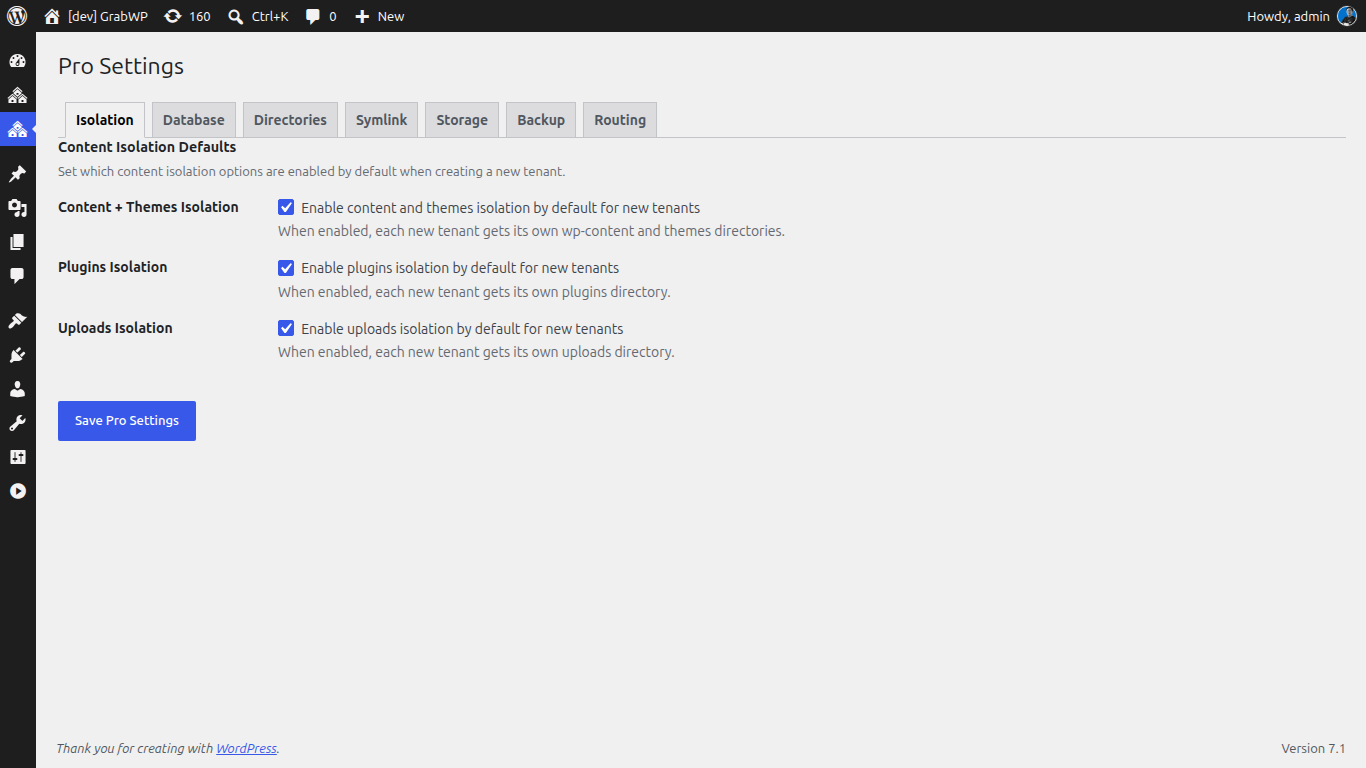
True per-client isolation means that each site owns its data and its code, and that nothing is shared by default. GrabWP Tenancy Pro builds each client as a tenant with three layers of separation.
- A dedicated database per client. Pro lets you choose, per tenant, between shared MySQL with table prefixes, a dedicated MySQL database, or a SQLite database. For client work you pick a dedicated database, so one client’s content lives in its own database rather than sharing a schema with everyone else. This is a data-isolation architecture, and it gives you a far stronger compliance story than a shared-database setup where all clients coexist in one schema.
- Isolated wp-content. On Pro, each tenant gets its own isolated wp-content directory, with its own themes and plugins directory underneath. Client files are not commingled in a single shared folder.
- Separate uploads. Even the free GrabWP Tenancy base plugin isolates each tenant’s uploads and gives it its own database table prefix. Pro builds on that base by adding the dedicated database and the fully separate wp-content on top.
The result is that a client’s data never mixes with another client’s, because it does not share a database, a content directory, or an uploads folder.
Per-Client Plugin and Theme Stacks, With No Conflicts
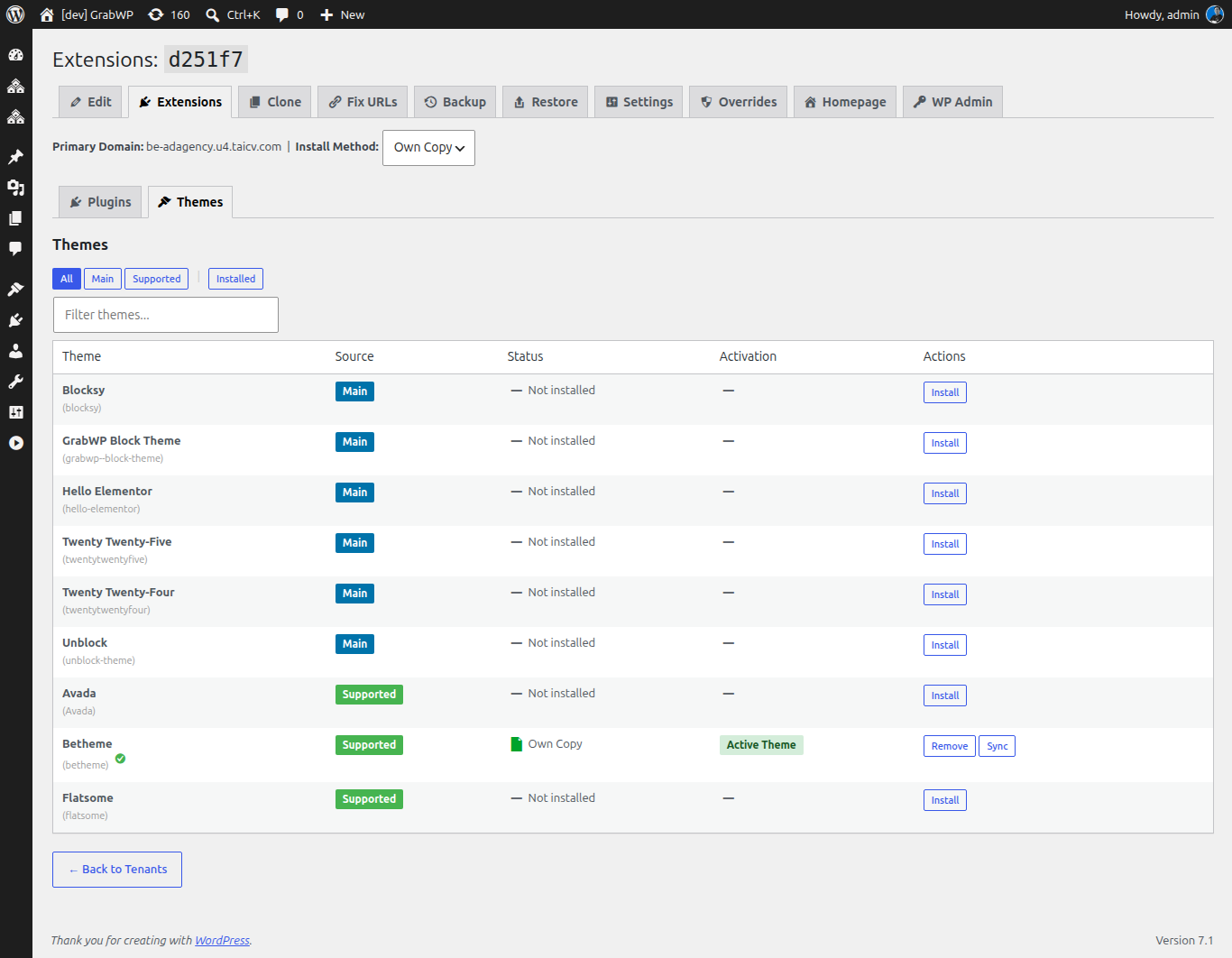
The most practical payoff of isolated wp-content is that each client runs its own plugin and theme stack. One client can run a WooCommerce shop with its own payment and shipping plugins while another runs a membership site with a completely different set, and the two never collide, because they do not share a plugins directory.
You manage each tenant’s stack from the Extensions page. From there you activate or deactivate plugins and switch themes for a specific tenant, with live status shown for each one. You are configuring one client’s site without reaching into anyone else’s. There is no network-wide activation to reason about and no risk that enabling a plugin for one client changes behavior for the rest of the portfolio.
This is the wall Multisite cannot give you. Instead of one shared code base that every site inherits, each client gets a stack you tune independently, so plugin compatibility becomes a per-client decision rather than a network-wide gamble.
Blast-Radius Control: Fix One Client Without Touching the Rest
Isolation is most valuable at the worst moment, when something goes wrong. Because each tenant is self-contained, a problem stays contained, and recovery is surgical.
GrabWP Tenancy Pro gives every tenant its own backup and restore, with a full step-by-step workflow that covers the database, uploads, content, and configuration. When one client needs to roll back, you restore that single tenant independently. The other clients on the same install are never involved, never paused, and never at risk from the operation.
Restore is flexible enough to survive real-world migrations, too. Pro supports cross-database restore, so you can move a tenant across database types, from shared MySQL to a dedicated MySQL database or to SQLite, when a client’s needs change. And because each tenant’s backup is its own, your recovery blast radius is exactly one client, which is what agency risk management should look like.
Contrast that with a Multisite restore, where the shared database means rolling back one site cleanly is awkward at best, and a full-network restore is the blunt instrument you are usually left with.
How to Adopt This Without Multisite
The best part is that none of this requires the structural commitment of Multisite. GrabWP Tenancy Pro runs on a standard single WordPress installation.
- Install on a normal WordPress site. Add the free GrabWP Tenancy base plugin and GrabWP Tenancy Pro to a standard install. You do not enable the Multisite network, and you do not restructure your existing site.
- Set your isolation defaults. In Pro Settings, choose a dedicated database as the default for new tenants and confirm content isolation, so every client you create inherits real separation from the start.
- Create a tenant per client. Each new client becomes an isolated tenant with its own database, its own wp-content, and its own uploads, all under the one install you already manage.
- Manage each stack independently. Use the Extensions page to set each client’s plugins and theme, and take a baseline backup per tenant so you have a clean restore point before work begins.
You keep the simplicity of one WordPress install and one dashboard, while your clients get the isolation that Multisite’s shared architecture cannot deliver. For a repeatable way to spin up each of these isolated sites the same way every time, pair this with our client site provisioning checklist.
Give Every Client a Real Wall
Multisite groups your clients into one shared database and one shared plugin set. Agency work needs the opposite: a dedicated database, isolated wp-content, and a blast radius of exactly one client per operation. GrabWP Tenancy Pro delivers that on a standard WordPress install, licensed once per installation with no per-client fees, starting at $9.99/month. See how it fits your practice on the agency page, and compare the base and Pro isolation levels on our comparison page before you decide.
Tác giả
GrabWP Team
WordPress Multi-Tenancy Experts
The GrabWP team builds and maintains the GrabWP Tenancy plugin, helping developers and agencies run scalable multi-tenant WordPress platforms. With years of experience in WordPress core, hosting infrastructure, and plugin development.
Câu hỏi thường gặp
- Why is WordPress Multisite not true isolation?
- Multisite runs every site in one shared database, with each site distinguished only by a table prefix. Plugins and themes are installed network-wide and share the same code and PHP process, so a plugin conflict or a database problem can affect every client on the network. That is separation by convention, not real isolation.
- Do I need Multisite to run isolated client sites with GrabWP?
- No. GrabWP Tenancy Pro runs on a standard single WordPress installation. Each client becomes an isolated tenant with its own content and database, so you get per-client isolation without turning on Multisite or restructuring your install.
- Can each client have its own database?
- Yes. On Pro you choose per tenant between shared MySQL with table prefixes, a dedicated MySQL database, or a SQLite database. A dedicated database per client means one client's data never mixes with another's in the same schema.
- Can I back up and restore one client without touching the others?
- Yes. Each tenant has its own backup and restore. You can restore a single client independently, and you can even restore across database types, so recovering one site never puts the rest of your portfolio at risk.
Editorial standards: Our content is written by WordPress experts with hands-on multi-tenancy experience. Articles are fact-checked and regularly updated to ensure accuracy.