Manage 40 to 200 Client Sites at Scale From One WordPress Dashboard

An agency that manages five WordPress sites can afford to log into each one. An agency that manages forty, or a hundred, or two hundred cannot. At that scale the daily maintenance work stops being a task and becomes a tax: a tax you pay in logins, in context switching, and in the quiet risk that one site in the fleet missed its update or its backup because nobody got to it.
This is the fleet operations problem, and it is different from the setup problem. Provisioning a client site well is a one-time act. Keeping a portfolio of client sites updated and backed up is a forever act, repeated across every site, every week. This guide shows how to run those recurring operations across a whole portfolio from a single dashboard using GrabWP Tenancy Pro, which runs every client site as an isolated tenant inside one WordPress installation.
The Ops Drag of N Dashboards
The hidden cost of a large portfolio is that almost every routine action multiplies by the number of sites you run. With separate installs, a hundred clients means:
- N logins. Every plugin toggle, theme switch, or settings change starts with authenticating into a different admin.
- N update queues. Each site tracks its own pending updates, and it is on you to visit each one to see and clear them.
- N backup jobs. Each site needs its own backup configured, scheduled, and monitored, and a backup you never verified is not really a backup.
None of this scales linearly with revenue. Win more clients and the login-switch-repeat overhead grows right alongside them. The fix is not a faster way to log into a hundred dashboards. It is to stop having a hundred dashboards.
Push Operations to Tenants From the Main Admin
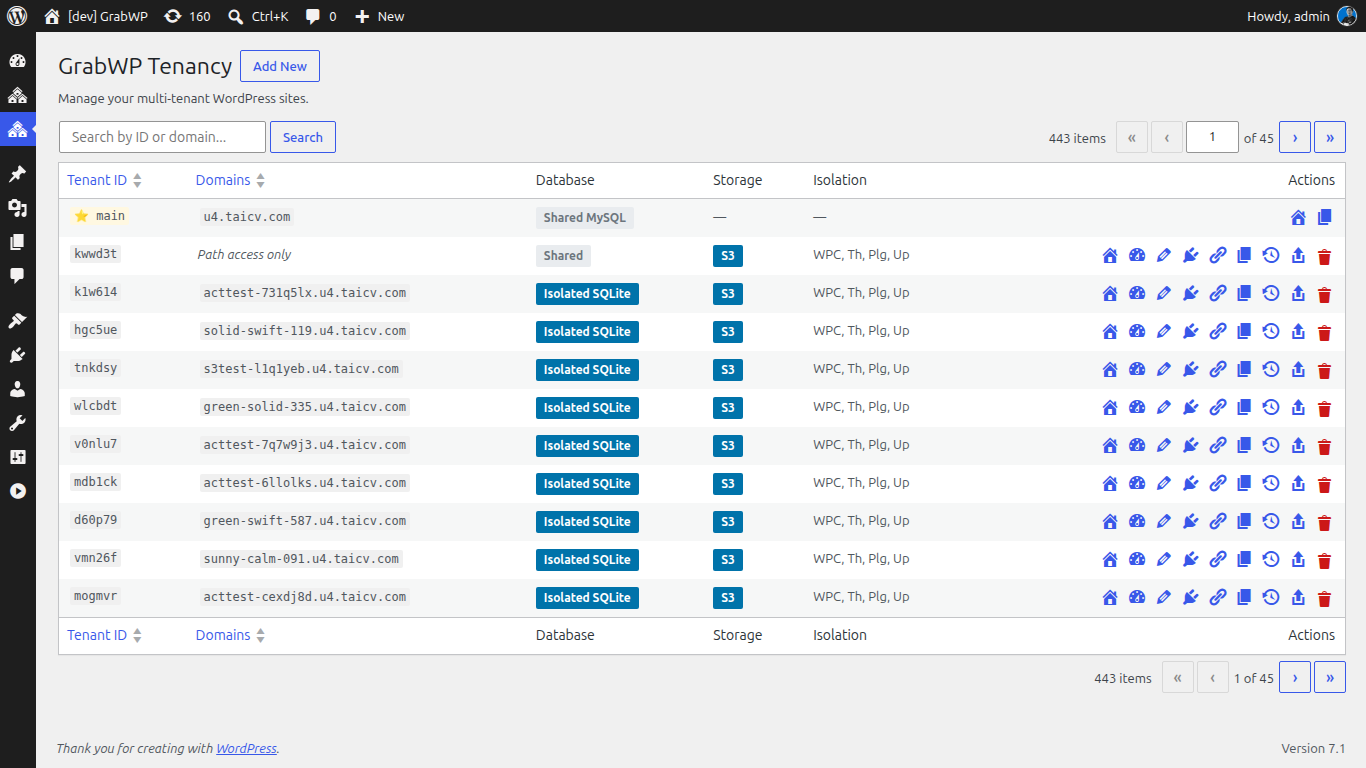
Because every client is a tenant inside one install, GrabWP Tenancy Pro lets the main admin push operations down to individual tenants instead of you logging in to perform them. This runs through a tenant directive system: a file-based signed queue for main-to-tenant operations, including creating a user, activating and deactivating plugins, switching a theme, and updating options.
In practice, that means the main dashboard becomes your control panel for the fleet:
- From the Extensions page, you activate or deactivate plugins and switch themes for a tenant, with live status shown so you can see what is running before and after the change.
- From the Tenant Settings page, you edit a tenant’s options inline from the main admin, with the changes applied through the same directive queue.
The signed, file-based queue matters here. Operations are written as directives the tenant picks up and applies, rather than you holding a hundred separate admin sessions open. You make the change once, from the place you already are, and the tenant carries it out.
Portfolio-Wide Scheduled Backups With Per-Tenant Overrides
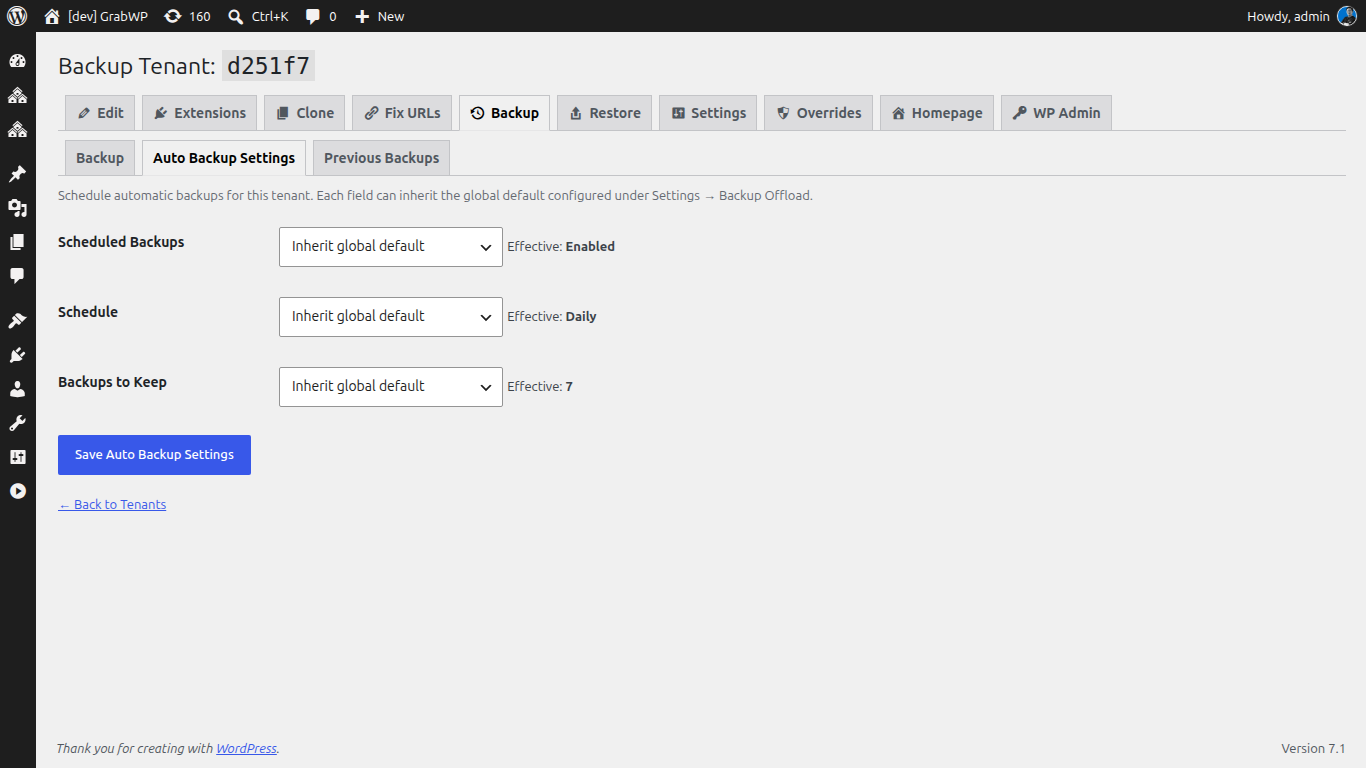
Backups are where fleet management earns its keep, because they are both the most repetitive task and the one with the highest cost of failure. GrabWP Tenancy Pro gives you scheduled automatic tenant backups built around global defaults with per-tenant overrides.
Set the policy once, at the portfolio level. Every tenant inherits your global defaults for whether backups are enabled, how often they run, and how many copies to retain. Then override only the exceptions:
- A high-traffic store might back up on the hourly or twice-daily recurrence.
- A standard brochure site might run daily or weekly.
- A low-change archive site might run fortnightly or monthly.
Retention is handled per tenant too, and after each successful run GrabWP prunes old local and remote backups down to the retention count you set, so storage does not creep upward across a large fleet. You are not configuring a hundred backup jobs. You are setting one default and adjusting the handful of tenants that need something different.
Automate and Audit With WP-CLI and S3
A dashboard is the right tool for oversight. For automation and auditing across a large fleet, GrabWP Tenancy Pro exposes WP-CLI backup commands so the whole operation can be scripted and scheduled outside the browser. The commands let you:
- Run a backup for a tenant on demand.
- Configure a tenant’s schedule from the command line.
- Show status and recent history so you can audit what ran and when.
- Reschedule every tenant in a single command when your policy changes.
That last command is the fleet operator’s lever: one invocation reapplies your schedule across the entire portfolio, no matter how many tenants it contains. Pair it with cron or your CI system and portfolio maintenance becomes a scripted, reviewable routine rather than a manual round of dashboard visits.
For durability and offsite copies, completed auto backups can offload to configured S3-compatible storage when auto-offload is enabled, so your fleet’s restore points live off the server automatically. The tenant list even shows a storage-driver badge per tenant, so you can see at a glance which sites are on local versus S3 storage.
To keep the schedule honest, Schedule Assurance in Pro Settings shows the WP-Cron status, the next scheduled backup, the available intervals, and system-cron guidance when WP-Cron is disabled. That gives you a single place to confirm the fleet’s backups are actually going to fire, rather than discovering a stalled scheduler the day you need a restore.
One Dashboard, the Whole Portfolio
The shift here is not a faster maintenance workflow. It is a different shape of work entirely. Instead of a hundred dashboards each holding one site’s updates and backups, you have one dashboard holding the whole portfolio:
- Push plugin, theme, and option changes to any tenant from the main admin through the directive queue.
- Set one backup policy with global defaults, and override only the tenants that need it.
- Script and audit the whole fleet through WP-CLI, with offsite copies on S3.
Everything runs under one WordPress installation and one license per installation, so operating two hundred client sites costs the same in licensing as operating twenty. The overhead of scale moves off your calendar and into a system built to carry it.
If you provision new clients into this same fleet, pair this with a repeatable provisioning checklist so every site enters the portfolio the same way it will be operated.
Operate Your Fleet From One Place
If your maintenance time grows every time you sign a client, the problem is not effort, it is architecture. GrabWP Tenancy Pro runs your entire client portfolio as tenants inside one dashboard, with directive-based operations and portfolio-wide scheduled backups, licensed once per installation at $9.99/month. See how it fits an agency workflow on the agency page.
Tác giả
GrabWP Team
WordPress Multi-Tenancy Experts
The GrabWP team builds and maintains the GrabWP Tenancy plugin, helping developers and agencies run scalable multi-tenant WordPress platforms. With years of experience in WordPress core, hosting infrastructure, and plugin development.
Câu hỏi thường gặp
- Do I have to log into each client site to run updates or backups?
- No. GrabWP Tenancy Pro runs every client site as a tenant inside one WordPress installation, so you operate the whole portfolio from the main admin. A file-based signed directive queue pushes operations like activating or deactivating plugins, switching themes, and updating options from the main dashboard to each tenant, and scheduled automatic backups run per tenant without you opening any of them.
- Can I set one backup schedule for the whole portfolio but change it for specific clients?
- Yes. Scheduled automatic tenant backups use global defaults that every tenant inherits, and each tenant can override the enabled state, schedule, and retention count. Recurrences include hourly, twice-daily, daily, weekly, fortnightly, and monthly, and successful runs prune old local and remote backups to your retention limit.
- Can I automate fleet backups from the command line?
- Yes. GrabWP Tenancy Pro ships WP-CLI backup commands to run a backup, configure a tenant's schedule, show status and recent history, and reschedule every tenant in one command. Completed backups can auto-offload to S3-compatible storage, which makes the whole flow easy to wire into your own cron or CI scripts.
- How is this licensed for an agency with many clients?
- GrabWP Tenancy Pro is licensed once per WordPress installation, not per client or per seat. Your entire fleet of tenants runs under one license and one dashboard, starting at $9.99/month.
Editorial standards: Our content is written by WordPress experts with hands-on multi-tenancy experience. Articles are fact-checked and regularly updated to ensure accuracy.