Stop Fighting WordPress Multisite Plugin Conflicts: Give Each Client Their Own Plugin Stack

WordPress Multisite is often sold as the way to run many client sites from one install. For plugins, it quietly does the opposite of what agencies expect. Multisite shares ONE wp-content directory and ONE database across every subsite. Plugin files live in one place for the whole network. That single shared layer is where the conflicts start, and no amount of per-site toggling makes it go away.
Why Multisite Plugin Management Causes Conflicts
In Multisite, plugins are installed network-wide. After that you have two choices: network-activate a plugin so it runs everywhere, or leave it inactive and let individual sites enable it. Either way, the plugin FILES are shared. All plugin code lives in the same codebase for every subsite.
That distinction matters more than it sounds. “Enabled per-site” does not mean “isolated.” It means the same physical code is present for all tenants and simply switched on for some of them. You cannot give two subsites two genuinely different, isolated plugin sets. If Client A needs version 4 of a plugin and Client B needs version 6, Multisite has nowhere to put both. One version wins, and it wins for everyone.
Real Scenarios Where This Bites
The shared layer turns small, local problems into network-wide ones:
- Incompatible plugins. Client A wants a booking plugin that hooks the same filters as Client B’s membership plugin. On separate installs this is a non-issue. On Multisite both plugins load in the same process space, and the fatal error one of them throws is felt across the network.
- Version pinning. A client running an older, stable stack refuses to upgrade a plugin because it breaks their custom flow. Another client needs the newest release for a security fix. On a shared codebase you cannot honor both requests.
- Security surface. Every plugin file present on the network is code that can be exploited, even on sites that never activated it. A vulnerable plugin sitting inactive in shared wp-content still ships with every subsite. The attack surface is the union of everyone’s plugins, not each client’s own.
Each of these traces back to the same root cause: one shared plugin and theme layer.
What Per-Client Isolation Should Actually Look Like
Real isolation means a client’s plugin is loaded code only for that client. If Client A installs, updates, or breaks a plugin, nothing changes for Client B. Concretely, that requires:
- A separate plugins directory per client, not a shared one with per-site switches.
- A separate themes directory per client, so theme conflicts and version differences stay contained.
- Independent versions, so pinning one client’s stack never blocks another’s upgrade.
- A blast radius of one, so a fatal plugin error takes down a single tenant instead of the network.
Multisite’s per-site enable flag cannot deliver any of this, because the files never stop being shared.
How Per-Tenant wp-content Delivers Separate Stacks
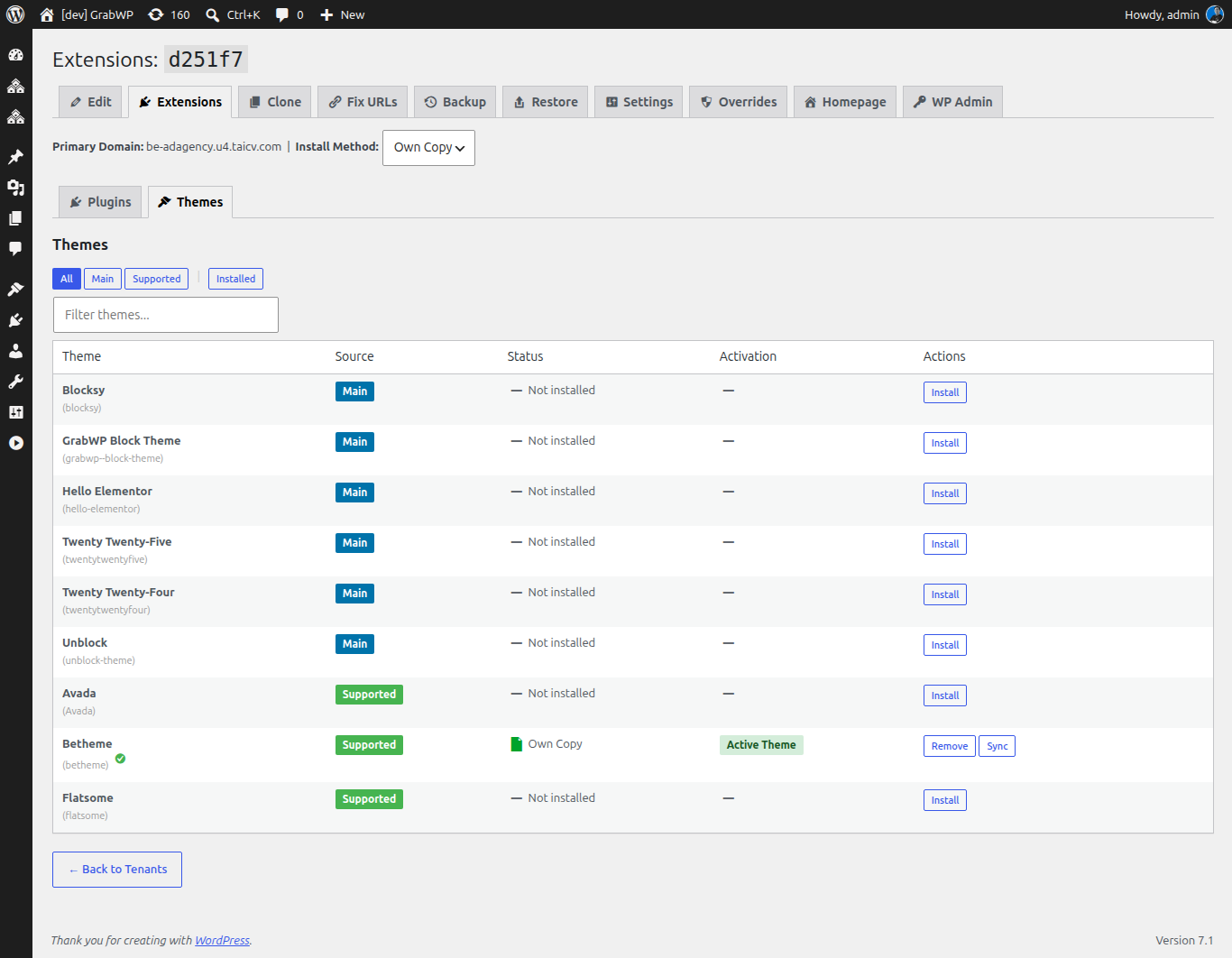
This is the gap GrabWP Tenancy Pro is built to close. Instead of one shared wp-content, Pro gives each tenant COMPLETE wp-content separation: its own isolated themes and plugins directory under its own content directory. Each client ends up with a genuinely separate plugin and theme stack, not a shared codebase toggled on and off.
Because the files are physically separate, the conflict scenarios above simply stop happening. Client A can run plugin version 4 while Client B runs version 6. An incompatible plugin only loads for the tenant that installed it. A vulnerable plugin sitting in one tenant’s directory is not part of any other tenant’s attack surface. Pro also pairs this with a dedicated MySQL or SQLite database per tenant and per-tenant backup and restore, so data isolation matches the code isolation.
The free GrabWP Tenancy plugin already isolates uploads, table prefixes, and domain or path routing, and gives you a single dashboard to create and manage tenants. Full per-tenant wp-content, meaning isolated plugins and themes, is the Pro feature. The free base isolates uploads and prefixes, not plugin and theme files, so reach for Pro specifically when the plugin layer is where your conflicts live.
Managing Many Isolated Stacks From One Dashboard
The obvious worry with isolation is that you trade one problem for another: instead of fighting conflicts, you now babysit dozens of separate plugin folders. GrabWP is designed so that does not happen.
Even with fully isolated stacks, you still manage every tenant from ONE WordPress install and one dashboard. Pro’s Extensions management page shows per-tenant live plugin and theme status, so you can see exactly what each client is running without logging into each site. A directive queue from the main site can activate or deactivate plugins, switch themes, and update options on any tenant. Isolation does not cost you central control: you get separate stacks and one place to drive them all. Per-tenant Performance and Security controls round out the same single-pane workflow.
Migrating a Conflict-Prone Client Onto Its Own Stack
Here is a concrete workflow for the one client whose plugins keep breaking your network:
- Install the free GrabWP Tenancy plugin on your WordPress install and confirm uploads and prefix isolation are working.
- Upgrade to Tenancy Pro to unlock complete per-tenant wp-content, then create a tenant for the problem client.
- Take a per-tenant backup first using Pro’s guided restore-ready backup, so you have a clean rollback point.
- Move the client’s plugins and theme into that tenant’s own isolated plugins and themes directory, at the exact versions they need.
- Pin their versions independently, without worrying about what any other tenant runs.
- Verify from the Extensions page that the tenant’s live plugin and theme status matches what you intended.
- Use the directive queue from the main site to activate the right plugins and switch the theme, then confirm the rest of your tenants are untouched.
The client that used to threaten the whole network now lives in a sealed box you still control centrally.
Tradeoffs and When It Matters
Per-tenant stacks use more disk than a single shared wp-content, because each tenant carries its own plugin and theme files. For a handful of near-identical sites that all run the same plugins, plain Multisite may be enough. If that describes you, read when not to use WordPress Multisite before adding any isolation layer.
The moment your clients need different plugins, different versions, or a smaller shared security surface, the shared layer becomes the bottleneck, and isolation pays for itself. For a broader look at keeping client sites apart, see how to isolate WordPress client sites without Multisite.
Start with the free GrabWP Tenancy plugin to isolate uploads, prefixes, and routing from one dashboard. When the plugin and theme layer is where your conflicts live, upgrade to GrabWP Tenancy Pro at $9.99/month for complete per-tenant wp-content, so every client gets a genuinely separate plugin and theme stack that you still manage centrally.
Tác giả
GrabWP Team
WordPress Multi-Tenancy Experts
The GrabWP team builds and maintains the GrabWP Tenancy plugin, helping developers and agencies run scalable multi-tenant WordPress platforms. With years of experience in WordPress core, hosting infrastructure, and plugin development.
Câu hỏi thường gặp
- Can you give two WordPress Multisite subsites completely different plugins?
- Not really. Multisite installs plugin files into one shared wp-content directory. You can network-activate a plugin everywhere or enable it per-site, but the plugin code is still shared across every subsite. You cannot give two subsites two genuinely isolated, independently versioned plugin sets.
- How does per-tenant wp-content stop plugin conflicts?
- With GrabWP Tenancy Pro, each tenant gets its own isolated themes and plugins directory under its own content directory. One client's plugin is only loaded code for that client, so an incompatible or crashing plugin cannot take down other tenants. Each stack is genuinely separate rather than toggled on and off from a shared codebase.
- Do isolated plugin stacks mean you lose central management?
- No. You still manage every tenant from one WordPress install and one dashboard. GrabWP Tenancy Pro adds a directive queue that lets the main site activate or deactivate plugins, switch themes, and update options on any tenant, so isolation does not cost you central control.
Editorial standards: Our content is written by WordPress experts with hands-on multi-tenancy experience. Articles are fact-checked and regularly updated to ensure accuracy.