Launch WordPress Campaign Microsites Fast, Without New Hosting Each Time

Every campaign has the same infrastructure problem hiding behind it. The creative is ready, the copy is signed off, and then someone has to stand up a place for it to live. For a marketing agency running launches back to back, that “place to live” quietly becomes a recurring tax: a new hosting account, a fresh WordPress install, another set of credentials to track, and a deployment process to babysit.
There is a faster pattern. Build a campaign microsite once as a reusable template, then clone it per launch and route it to a domain or a path. This guide walks through that workflow using GrabWP Tenancy and GrabWP Tenancy Pro, where every campaign is a tenant on one WordPress installation.
The per-campaign hosting tax
When each campaign gets its own hosting account, the cost is not just the monthly bill. It is the setup time, the WordPress install, the theme and plugin stack you rebuild from scratch, and the onboarding of yet another dashboard into your password manager. Multiply that by every product drop, seasonal push, and event landing page across every client, and the overhead grows faster than the work does.
The goal is to decouple “we are launching a campaign” from “we are provisioning infrastructure.” You want the second part to be near-instant and repeatable, so your team spends its time on the campaign, not the plumbing.
Build a campaign template tenant once
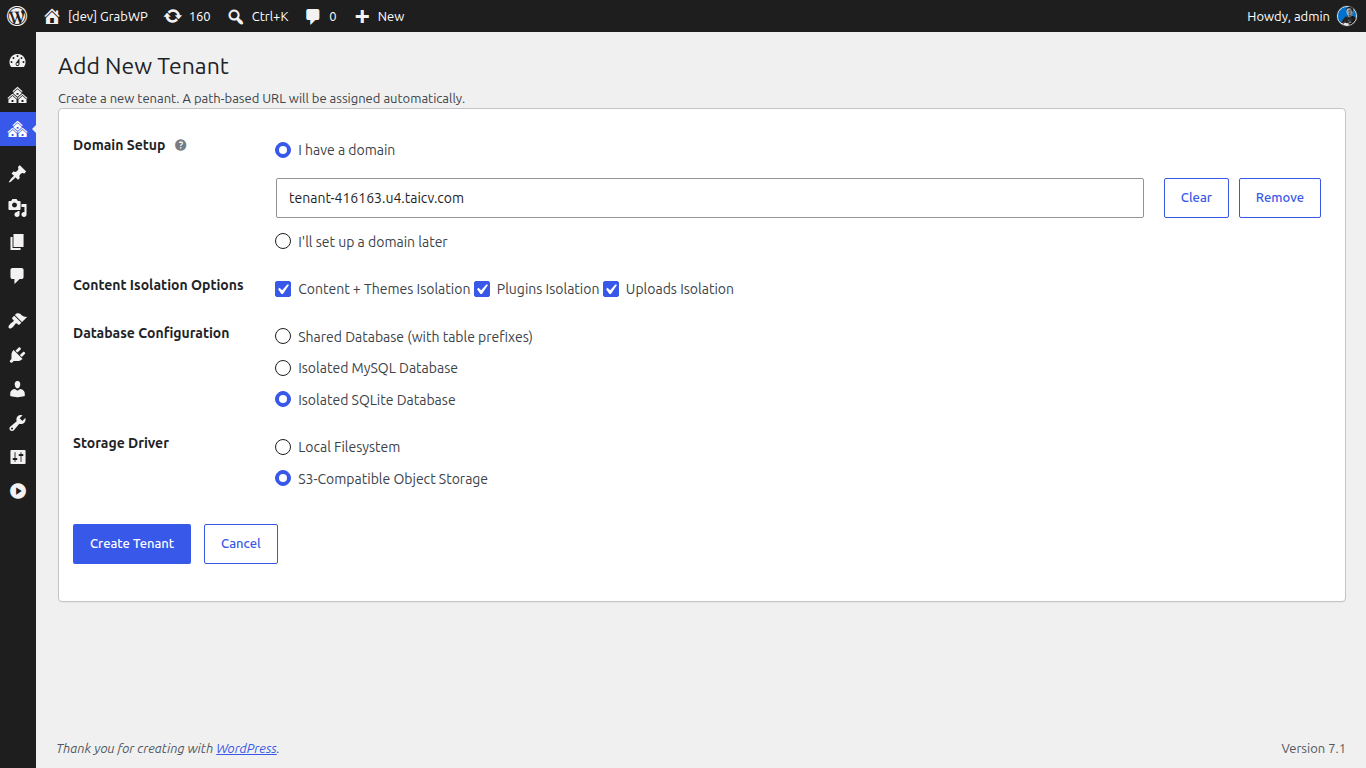
Instead of starting blank each time, invest an hour building a single template tenant that captures how your agency ships campaign sites:
- Create a tenant in GrabWP → Tenants and name it something like
campaign-template. - Install the theme and the plugin stack you use for landing pages (page builder, forms, analytics, consent banner).
- Build the reusable structure: a hero section, a lead-capture block, a thank-you page, and your standard tracking setup.
- Set the per-tenant Performance and Security defaults you want every campaign to inherit. GrabWP Tenancy exposes a per-tenant Performance and Security tab that can apply settings like disabling WP-Cron, turning XML-RPC off, capping post revisions, setting how quickly trash empties, and blocking outbound HTTP except to an allowlist of hosts.
This template is the master you never launch from directly. It exists to be copied.
Clone it per launch
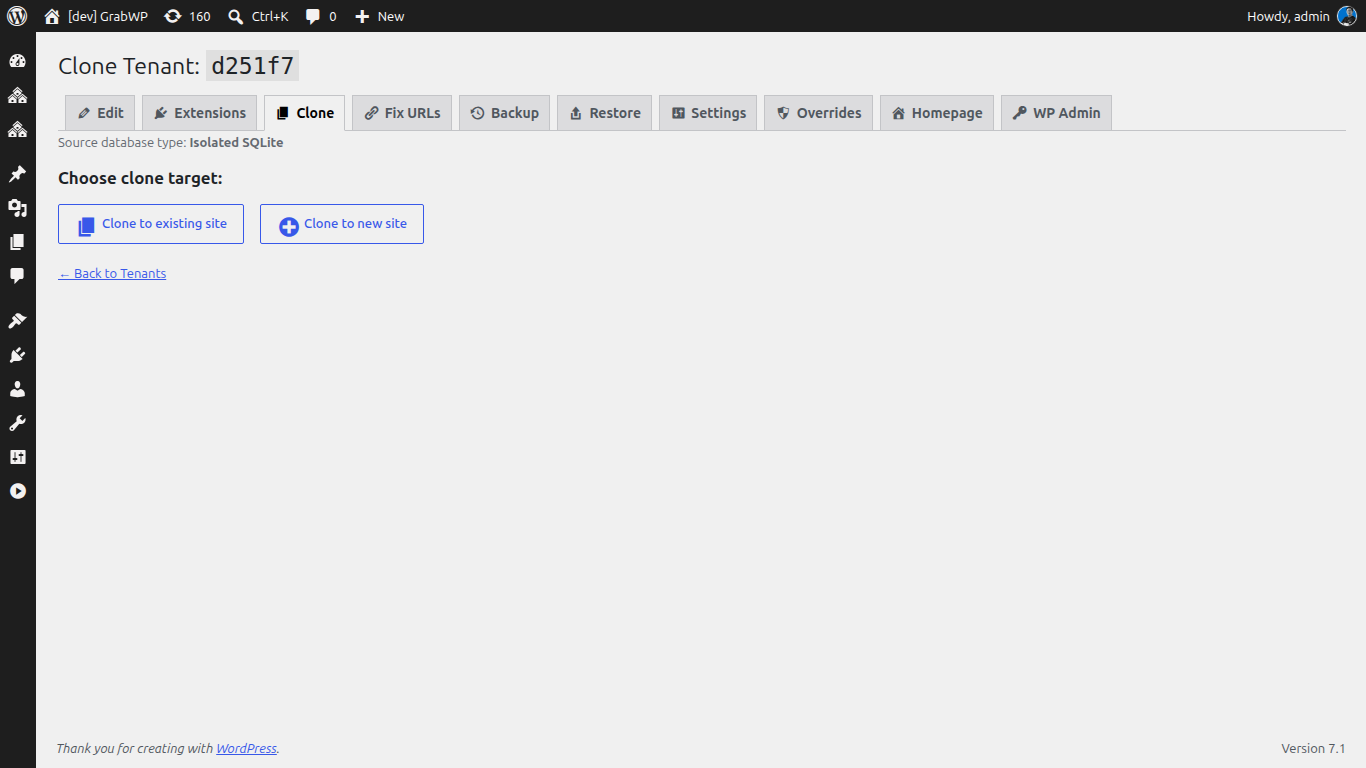
When a new campaign lands, clone the template rather than rebuilding it. GrabWP Tenancy Pro ships a full AJAX-driven clone workflow that copies the tenant database tables and the uploads, and runs a comprehensive URL search-replace across the cloned database, including serialized data, so internal links and settings point at the new site instead of the template.
- Open the clone workflow from the tenant list and pick
campaign-templateas the source. - Name the new tenant for the campaign, for example
spring-launch. - Choose the database option for this tenant. Pro lets you pick shared MySQL with table prefixes, a dedicated MySQL database, or SQLite per tenant.
- Run the clone and let the AJAX progress UI copy the database and uploads and rewrite the URLs.
You now have a working campaign microsite that is a faithful copy of your template, with none of the manual rebuild.
Route it: custom domain or /site/ path
A cloned tenant needs an address. GrabWP Tenancy gives you two routing styles:
- Custom domain per tenant. Point the campaign’s own domain (or a subdomain you control) at the tenant. This is the clean choice for a client-facing launch that needs its own brand on the URL.
- Path-based routing. Serve the campaign from a subdirectory of an existing site, like
example.com/site/spring-launch. The path prefix defaults tositeand is configurable viaGRABWP_TENANCY_PATH_PREFIX, and path aliases 301-redirect to the alias URL so you can hand out a clean link.
Path routing is handy for quick internal or short-lived campaigns where a dedicated domain would be overkill, while custom domains suit flagship client launches. Either way, no DNS-to-hosting-account setup dance is required beyond pointing the address.
Tear down or archive after the campaign
Campaigns end. When one wraps, you do not want a pile of half-live microsites lingering on the install. The clean exit is backup, then delete:
- Run a tenant backup. Pro’s backup workflow is a multi-step AJAX process with a progress UI, and finished backups can be listed, downloaded, deleted, or restored later. Auto-offload can push the backup to S3-compatible storage after completion.
- Confirm the backup is on disk (or offloaded to S3) so you have an archive point.
- Delete the tenant to reclaim resources on the install.
If the client revives the campaign next season, restore the tenant from its backup instead of rebuilding. That turns a finished campaign into a reusable asset rather than dead weight.
Where this fits
This clone-and-route pattern is one piece of running an agency on a single install. If you manage several brands from that same WordPress, see how to keep them cleanly separated in Run a Multi-Brand Client Portfolio From One WordPress Install, and if clients ask how their data is handled, read Give Marketing Clients a Clean Data-Privacy Story With Per-Client Isolation.
Ready to stop paying a hosting tax per launch? GrabWP Tenancy Pro is $9.99/month (or $99.99/year, or $499.99 lifetime) for unlimited tenants on one install. See the full agency breakdown on the marketing agencies page.
Tác giả
GrabWP Team
WordPress Multi-Tenancy Experts
The GrabWP team builds and maintains the GrabWP Tenancy plugin, helping developers and agencies run scalable multi-tenant WordPress platforms. With years of experience in WordPress core, hosting infrastructure, and plugin development.
Câu hỏi thường gặp
- Do I need a new hosting account for every campaign microsite?
- No. With GrabWP Tenancy Pro every campaign runs as a tenant on your existing single WordPress installation. You clone a template tenant and route it to a domain or path, so there is no new hosting account, no new WordPress install, and no new deployment pipeline per launch.
- How fast can I stand up a new campaign microsite?
- Once you have a campaign template tenant built, cloning it is a full AJAX workflow that copies the database tables and uploads and rewrites URLs for you. In practice a new campaign environment is ready in a few minutes, then you point a domain or a /site/ path route at it.
- Can each campaign live on its own domain?
- Yes. GrabWP Tenancy supports domain-based routing so a campaign can use its own custom domain, or path-based routing where the campaign lives at a subdirectory like example.com/site/spring-launch. The path prefix is configurable, and path aliases 301-redirect to the alias URL.
- What happens to a microsite after the campaign ends?
- Take a backup of the tenant, then delete it to reclaim resources. The scheduled and on-demand backup system keeps a restore point on disk (or offloaded to S3), so you can archive a finished campaign and bring it back later if the client revives it.
- Will one campaign site affect the others on the same install?
- No. Each tenant has isolated database data and its own uploads directory. Pro adds complete wp-content separation and flexible per-tenant databases, so a heavy launch or a plugin change on one campaign does not touch the rest of your portfolio.
Editorial standards: Our content is written by WordPress experts with hands-on multi-tenancy experience. Articles are fact-checked and regularly updated to ensure accuracy. Last verified: .