Run a Multi-Brand Client Portfolio From One WordPress Install, Without Data Bleed

A marketing agency rarely manages one website. It manages a portfolio: a fashion brand here, a B2B SaaS client there, a local restaurant group, each with its own look, its own plugin needs, and its own expectations about where their data sits. The hard part is not building any single site. It is running all of them together without the whole thing turning into a tangle of logins and shared risk.
This guide covers how to run a multi-brand portfolio from a single WordPress installation using GrabWP Tenancy Pro, keeping each brand cleanly isolated so there is no data bleed between clients.
Why separate logins and separate hosts do not scale
The default agency setup is one hosting account and one WordPress install per client. It feels safe because everything is physically apart, but it scales badly:
- Every new client adds another dashboard, another set of credentials, and another update cycle.
- Nobody has a single view of the portfolio, so status checks mean logging into each site one at a time.
- Costs climb per client instead of per server, so winning work grows your overhead rather than your margin.
Multisite is the usual “fix,” but it swings too far the other way. Every site shares one database and one wp-content, which is exactly the shared surface you do not want across unrelated client brands. You need isolation without the per-client hosting sprawl. That is the gap tenancy fills.
Dedicated database per client for real isolation
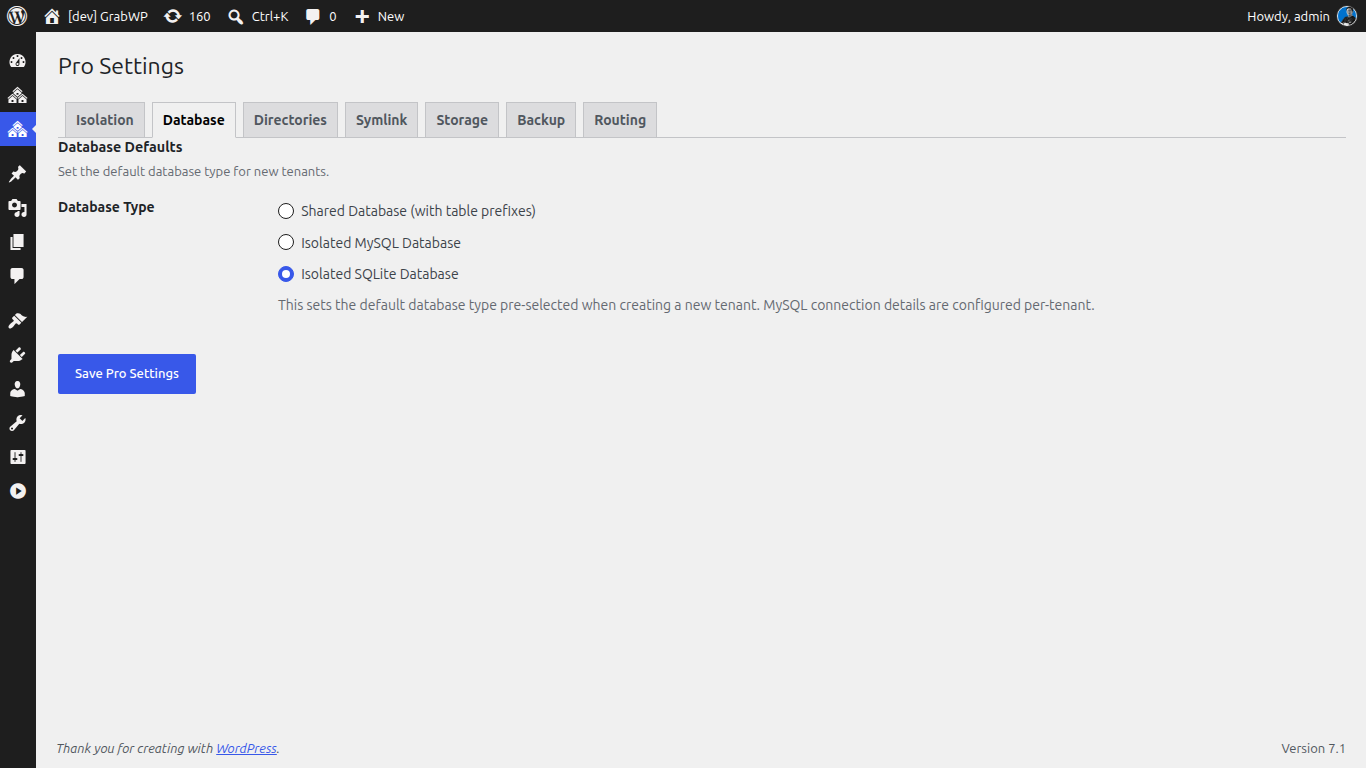
The foundation of no-data-bleed is giving each brand its own database. GrabWP Tenancy Pro offers flexible database options per tenant: shared MySQL with table prefixes, a dedicated MySQL database, or SQLite.
For a multi-brand portfolio where clients care that their data is theirs, assign a dedicated database per tenant:
- When you create or clone a client tenant, choose the dedicated MySQL option for that tenant.
- Repeat per brand, so each client’s content, users, orders, and settings live in a separate database.
- Mix and match where it makes sense. A small brochure brand can run SQLite while a busy e-commerce client gets its own MySQL database.
Because the data lives apart, one brand cannot read or reach into another brand’s data, even though they share the same WordPress core.
Isolated wp-content and per-client stacks
Data isolation is only half the story. Two brands almost never want the same plugins and themes. GrabWP Tenancy Pro provides complete wp-content separation: an isolated themes and plugins directory per tenant.
This means:
- Each brand installs and updates its own plugin stack without forcing that choice on anyone else.
- A theme or a page builder that one client insists on stays confined to that client’s tenant.
- Extension management lets you sync, convert (symlink to copy or back), and repair a tenant’s extensions, so you control how shared or how isolated each stack is.
The result is per-client customization with no cross-contamination, which is impossible to guarantee when every site shares one wp-content.
Managing the whole portfolio from one dashboard
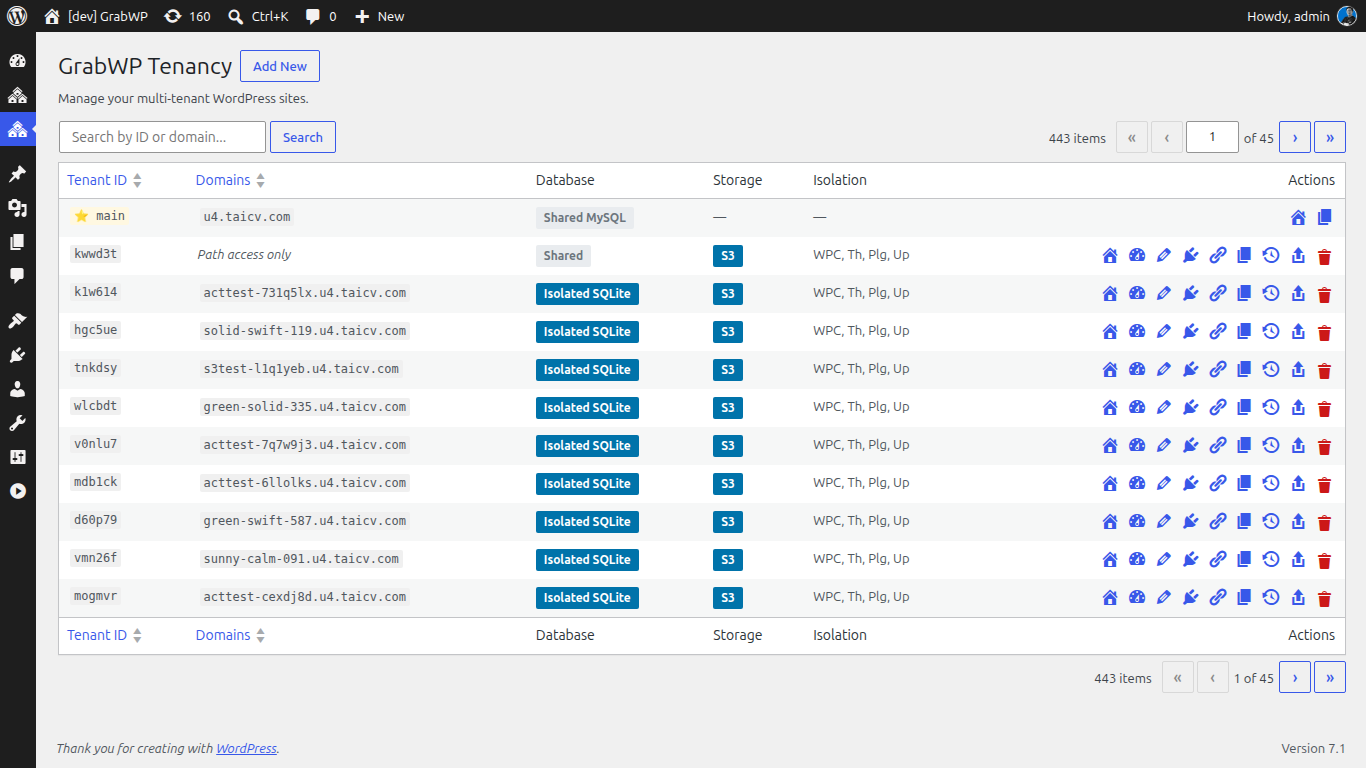
The payoff of consolidation is that all this isolation still lives under one roof. Every brand is a tenant on a single installation, so you administer the portfolio from one place:
- The tenant list gives you the whole portfolio at a glance, with a storage-driver badge (S3 or Local) per tenant so you know how each brand’s media is stored.
- Per-tenant settings are editable inline, so adjusting one brand does not mean a full context switch.
- You update WordPress core once for the shared install rather than chasing the same update across twenty separate sites.
One login, full portfolio view, and no password-manager gymnastics.
Independent backup and restore per brand
Running brands together should never mean their fates are tied together. GrabWP Tenancy Pro keeps recovery per tenant:
- Before a risky change to a client’s site, run a tenant backup. The backup workflow is a multi-step AJAX process with a progress UI.
- Manage each brand’s backups independently: list, download, delete, or restore on-disk backups, with restore tabs for an existing backup versus an uploaded file.
- Restore just the affected brand from its own backup, including across database types (shared MySQL, dedicated MySQL, or SQLite), without touching any other tenant.
- Set scheduled auto backups (hourly, twice-daily, daily, weekly, fortnightly, or monthly) with per-tenant overrides, retention, and optional S3 offload, so each brand is protected on its own cadence.
If one brand needs to leave the shared install later, you can export its database and files and migrate that tenant to standalone hosting, cleanly, because it was isolated all along.
Where this fits
Consolidating brands onto one install pairs naturally with fast launches: see how to spin up per-campaign sites in Launch WordPress Campaign Microsites Fast, Without New Hosting Each Time. And when a client asks how their data is handled, walk them through Give Marketing Clients a Clean Data-Privacy Story With Per-Client Isolation.
GrabWP Tenancy Pro is $9.99/month (or $99.99/year, or $499.99 lifetime) for unlimited client tenants on one installation. See the full agency case on the marketing agencies page.
Tác giả
GrabWP Team
WordPress Multi-Tenancy Experts
The GrabWP team builds and maintains the GrabWP Tenancy plugin, helping developers and agencies run scalable multi-tenant WordPress platforms. With years of experience in WordPress core, hosting infrastructure, and plugin development.
Câu hỏi thường gặp
- Can I run multiple client brands from one WordPress install without their data mixing?
- Yes. GrabWP Tenancy Pro gives each client a tenant with its own database. You can choose a dedicated MySQL database per tenant (or SQLite, or shared MySQL with prefixes), so one brand's content, users, and settings never live in another brand's data.
- Do clients share plugins and themes on a single install?
- No, not with Pro. GrabWP Tenancy Pro provides complete wp-content separation, meaning an isolated themes and plugins directory per tenant. Each brand runs its own plugin and theme stack, so an update or a plugin one client needs does not affect another.
- How do I manage the whole portfolio without logging into 20 dashboards?
- Every tenant lives on one WordPress installation, so you manage the portfolio from a single admin. You see the tenant list with per-tenant storage-driver badges and settings, instead of juggling separate logins for each brand.
- Can I back up and restore one brand without touching the others?
- Yes. Backups and restores are per tenant. You can back up a single brand before a change and restore just that tenant from its own backup, using an AJAX workflow with a progress UI, without affecting any other client on the install.
- What if a brand outgrows the shared install?
- You can export that tenant's database and files and migrate it to standalone hosting. Isolation per tenant means the export is clean, so moving one brand out does not disturb the rest of the portfolio.
Editorial standards: Our content is written by WordPress experts with hands-on multi-tenancy experience. Articles are fact-checked and regularly updated to ensure accuracy. Last verified: .