Custom Domains for a WordPress SaaS: How Tenant Domain Mapping Works

If you are building a WordPress SaaS, sooner or later a customer asks the same question: “Can I use my own domain?” How you answer that shapes your whole product. This guide covers how tenant domain mapping works in practice with the GrabWP Tenancy plugin: the routing options, how customers add domains themselves, and what actually happens on the server.
Why Domains Matter for a WaaS
In a Website-as-a-Service (WaaS) business, the domain is the customer’s front door. It affects trust, branding, and SEO. A client who sees their site at yourbrand.com/site/acme-widgets treats it as a demo. The same client at acmewidgets.com treats it as their business.
Domains matter for three concrete reasons:
- Branding. Customers want their name in the URL bar, not yours.
- SEO. Search engines index content per hostname. A custom domain lets each tenant build its own authority.
- Perceived ownership. A custom domain makes the product feel like theirs, which reduces churn and supports higher pricing.
The trick is offering custom domains without turning every signup into a manual DNS support ticket. That means starting simple and upgrading on demand.
The Routing Options: Custom Domain vs Path-Based
GrabWP Tenancy supports two routing models, and you can mix them across your tenant base.
Domain-based routing maps a full custom domain to one tenant. When a request arrives for acmewidgets.com, GrabWP resolves it to the Acme tenant and loads that tenant’s data. This is what customers on a paid plan usually want.
Path-based routing puts each tenant under a path on your shared domain, like yoursite.com/site/acme-widgets. No DNS changes are required, which makes it perfect for onboarding, trials, and free tiers. The path prefix is configurable through the GRABWP_TENANCY_PATH_PREFIX constant, which defaults to site. Set it to something like app or clients to match your product.
// wp-config.php
define( 'GRABWP_TENANCY_PATH_PREFIX', 'clients' );
// Tenants now live at yoursite.com/clients/acme-widgets
Both models flow through the same centralized tenant URL resolution layer, so you do not have to pick one and commit forever. A tenant can live on a path today and a custom domain tomorrow.
How Customers Add a Domain From Their Dashboard
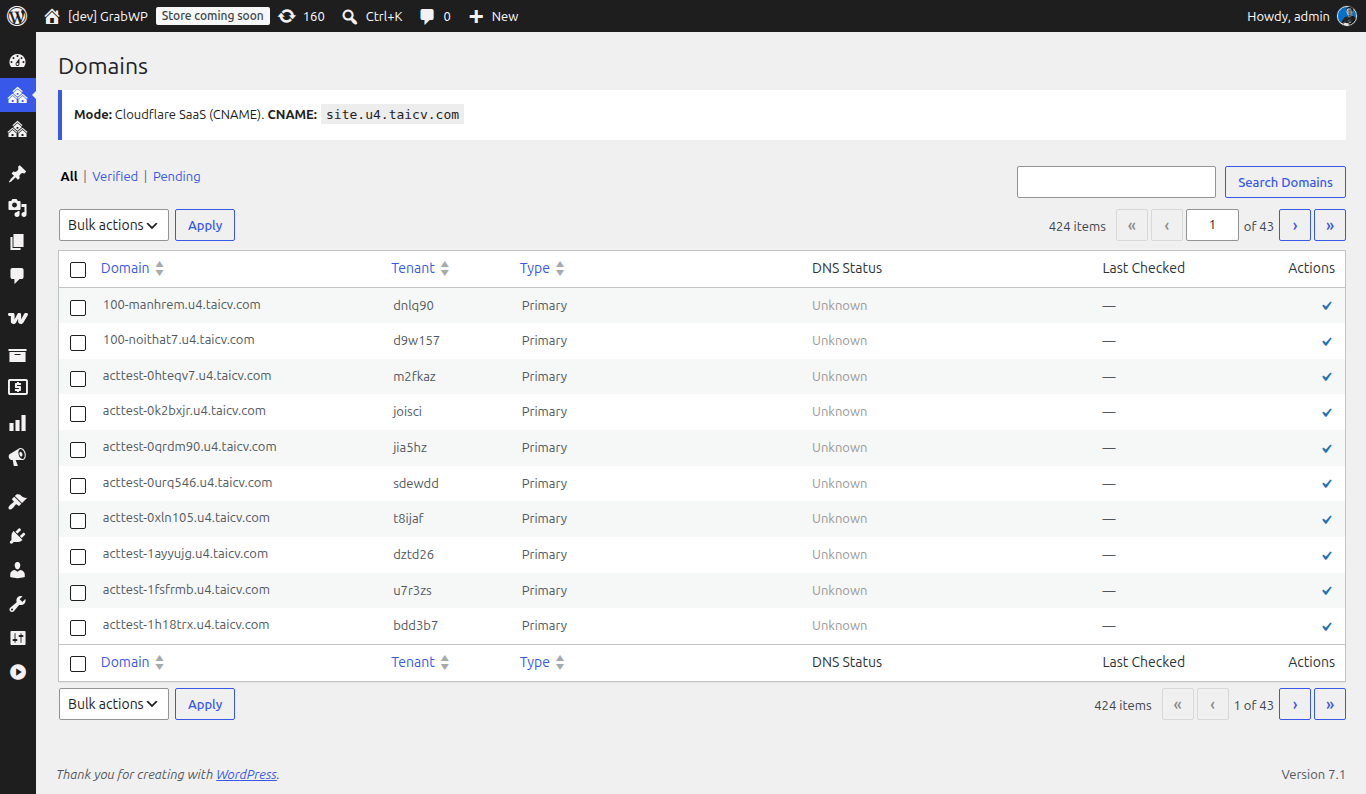
You do not want to be the middleman for every domain change. GrabWP’s WaaS layer gives tenants a self-service dashboard through the [grabwp_waas_dashboard] shortcode. Drop that shortcode on a page in your control site and each logged-in customer sees their own dashboard.
The dashboard includes a Domains tab where customers manage the domains attached to their tenant. From there a customer can register the custom domain they want to point at their site. When a domain is activated, the WaaS layer can send a domain-activation notification email so the customer knows the mapping is live.
The customer-facing flow looks like this:
- Customer opens their dashboard and clicks the Domains tab.
- Customer enters the domain they own, for example
acmewidgets.com. - Customer points that domain’s DNS at your server (an A record or CNAME, per your setup).
- Once DNS resolves and the certificate is in place, the tenant loads on the custom domain.
As the operator, you can still manage everything centrally through the admin interface or the tenant mapping file, which is useful for bulk changes or handling domains on behalf of a customer.
What Happens on the Server
When a domain is mapped, GrabWP does the WordPress-side work of making requests resolve to the correct tenant. Two things are worth understanding.
Routing. Centralized tenant URL resolution inspects the incoming hostname or path and loads the matching tenant. Domain-based and path-based requests both pass through this single resolver, so behavior stays consistent no matter how a tenant is reached.
Symlink sync. In the Pro version, GrabWP keeps domain symlinks in sync automatically whenever a tenant is created, updated, or deleted. This works across the admin UI, the REST API, and WP-CLI, so a tenant provisioned by your signup automation gets the same treatment as one you create by hand. There is also a Pro Settings action to sync domain symlinks across all tenants at once, which is handy after a migration or a bulk import.
One boundary to be clear about: GrabWP does not issue TLS certificates or manage DNS. Pointing a customer’s domain at your server and provisioning an HTTPS certificate is standard web-server work, handled by your host, a reverse proxy, or a tool like Certbot. GrabWP handles the mapping and routing once the request reaches WordPress. Keeping that line clear saves you a lot of confused support tickets.
Starting on a Shared Domain and Upgrading Later
The cleanest onboarding path is to start every tenant on a shared, path-based URL and upgrade to a custom domain only when the customer asks.
Here is why this works so well. A new signup at yoursite.com/site/acme-widgets needs zero DNS configuration, so the customer is live in seconds. When they decide to go pro, they add a custom domain from the Domains tab.
With Pro alias routing enabled, the upgrade is smooth: the old tenant-ID URLs 301-redirect to the alias URL, preserving both the sub-path and the query string. That means existing links, bookmarks, and any indexed pages carry over to the new domain without breaking, and search engines are told the content moved permanently.
This staged model also maps naturally onto pricing. Path-based sites can sit on your free or trial tier, and custom domains can be a paid feature on the Pro plan at $9.99/month. Customers upgrade when the value is obvious to them, which is exactly when they want their own domain.
Common Pitfalls
A few issues come up repeatedly when teams first roll out custom domains:
- Expecting the plugin to issue certificates. It does not. Provision TLS at the server or proxy layer before mapping the domain.
- DNS not propagated yet. A freshly pointed domain can take time to resolve. Verify DNS before assuming the mapping is broken.
- Forgetting to sync symlinks after bulk changes. If you import or migrate tenants outside the normal create flow, run the Pro Settings action to sync domain symlinks across all tenants.
- Skipping 301 redirects on upgrade. Without alias routing, old path-based links can go stale. Enable Pro alias routing so tenant-ID URLs redirect to the custom domain.
- Changing the path prefix after launch. If you change
GRABWP_TENANCY_PATH_PREFIXlater, existing path URLs shift. Decide on your prefix early.
Get Started
Custom domain mapping is the difference between a demo and a real product. Start every customer on a path-based URL for instant onboarding, then let them upgrade to their own domain from the Domains tab when they are ready. GrabWP handles the WordPress-side routing and symlink sync so the right tenant always loads.
Ready to offer custom domains in your own WordPress SaaS? Explore the GrabWP WaaS platform, read our companion guide on how to build a WordPress SaaS with no code, or grab the free GrabWP Tenancy plugin to start experimenting today.
Written by
GrabWP Team
WordPress Multi-Tenancy Experts
The GrabWP team builds and maintains the GrabWP Tenancy plugin, helping developers and agencies run scalable multi-tenant WordPress platforms. With years of experience in WordPress core, hosting infrastructure, and plugin development.
Frequently Asked Questions
- Does GrabWP issue SSL certificates for my customers' custom domains?
- No. GrabWP handles the WordPress-side routing and mapping so the right tenant loads for each domain. Issuing TLS certificates and pointing DNS at your server is standard web-server work, typically handled by your host, a reverse proxy, or a tool like Certbot. Point the customer's DNS at your server, provision the certificate, then map the domain to the tenant in GrabWP.
- Can one tenant have more than one domain?
- Yes. GrabWP Tenancy supports multiple domains per tenant. You can map a primary custom domain plus additional aliases through the admin interface or the tenant mapping file, and centralized URL resolution routes all of them to the same tenant.
- Can a customer start on a shared domain and add a custom domain later?
- Yes. Start every tenant on a path-based URL like yoursite.com/site/client-a with no DNS changes, then add a custom domain when the customer is ready. With Pro alias routing enabled, the old tenant-ID URLs 301-redirect to the new domain, preserving the sub-path and query string.
Editorial standards: Our content is written by WordPress experts with hands-on multi-tenancy experience. Articles are fact-checked and regularly updated to ensure accuracy.