How to Build a WordPress SaaS (WaaS) Without Writing Code

A Website-as-a-Service platform, or WaaS, lets customers sign up, pay, and walk away with a working website in minutes, with no manual setup on your side. This guide walks through building one on WordPress using GrabWP Tenancy WaaS, without writing code. GrabWP WaaS is in guided beta, so treat this as a real setup path with hands-on support, not a one-click magic button.
What a WaaS Is and Why WordPress Multi-Tenancy Is the Foundation
A WaaS is a productized website service. Instead of building sites one at a time, you sell subscriptions to a platform that spins up a ready-to-use site for every customer. Think of the difference between a freelancer and a hosting product: the WaaS turns your delivery process into self-service.
The hard part is giving every customer an isolated, fully functional WordPress site without spinning up a separate installation for each one. That is exactly what multi-tenancy solves. GrabWP Tenancy provides multi-tenancy without WordPress Multisite, so each customer gets an isolated tenant from a single codebase, and you avoid the shared-tables and network-admin complexity that Multisite carries. GrabWP WaaS is the self-service SaaS layer that sits on top of that tenancy engine and adds signup, billing, and automated provisioning.
If you want to understand the underlying isolation model first, read the WordPress multi-tenancy setup guide. The WaaS layer assumes that foundation is in place.
The Pieces of a WordPress WaaS
A complete WaaS is made of a handful of moving parts. GrabWP WaaS ships all of them:
- Signup wizard - a multi-step flow covering plan selection, a template browser, and automated provisioning, dropped onto a page with the
[grabwp_waas_signup]shortcode. - Billing - pluggable providers, with Polar.sh and WooCommerce built in. A SePay adapter for Vietnamese bank transfer is available separately.
- Provisioning - a durable state machine that creates the tenant after payment, with retry and idempotent finalization.
- Tenant dashboard - the customer control panel via
[grabwp_waas_dashboard], where they manage domains, plan, backups, settings, and their account. - Platform admin - your control room for subscriptions, plan tiers, the template catalog, an activity log, analytics, and provisioning recovery.
There is also a template catalog page you can publish with [grabwp_waas_templates], a full REST API at /wp-json/grabwp-waas/v1/, and Gutenberg blocks as alternatives to the shortcodes if you prefer building pages in the block editor.
Configuring Plans and Auth
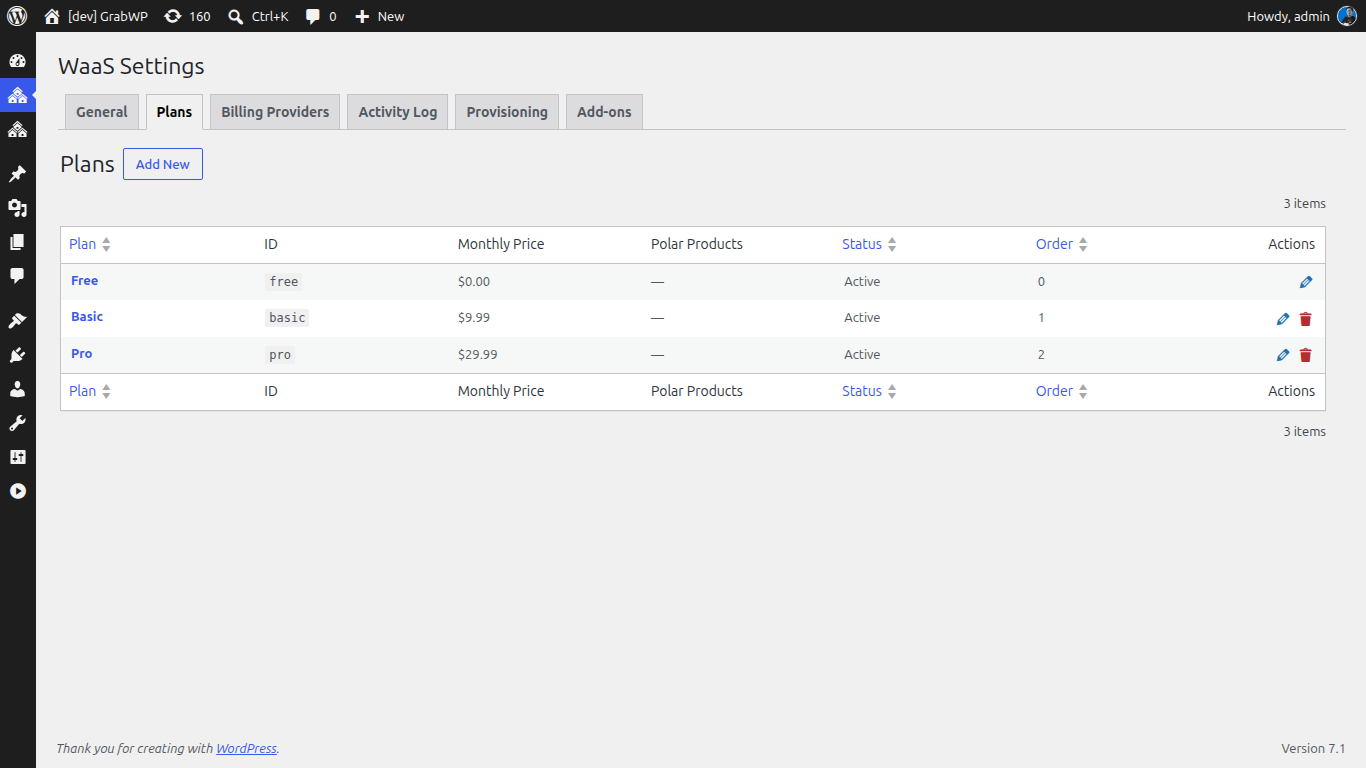
Once the free base plugin, GrabWP Tenancy, and the WaaS layer are activated, everything starts in one place: GrabWP Tenancy WaaS -> Settings.
Here you choose your billing provider, define your plan tiers, set the auth mode, and edit the email templates. Plan tiers are where you map subscriptions to what a tenant can do, so this is the step that turns your pricing idea into an actual product. Keep your first launch simple with a small number of tiers rather than a sprawling matrix.
Authentication is a single decision with two options, controlled by the waas_auth mode:
- WordPress native login - customers get standard WordPress accounts and log in with a username and password.
- Email OTP - customers receive a one-time code by email, which lowers signup friction and skips password management.
Pick the mode that fits your audience. OTP tends to convert better for non-technical buyers, while native login is familiar to WordPress users. For billing detail, including how the built-in providers differ, see the companion walkthrough on WordPress SaaS billing with Polar and WooCommerce.
The Self-Service Signup Flow Customers See
Create a page and add the [grabwp_waas_signup] shortcode. That single shortcode renders the whole multi-step wizard your customers move through:
- Choose a plan - the customer selects one of the tiers you defined.
- Browse and pick a template - the template browser lets them preview and select a starting design from your catalog.
- Pay - checkout runs through your configured billing provider.
- Provisioning - the wizard hands off to automated provisioning and shows progress while the tenant is built.
From the customer’s point of view this is one continuous flow that ends with a working site. There is no back-and-forth email, no waiting for you to manually set anything up, and no exposure to the WordPress admin during signup.
Automated Provisioning Explained
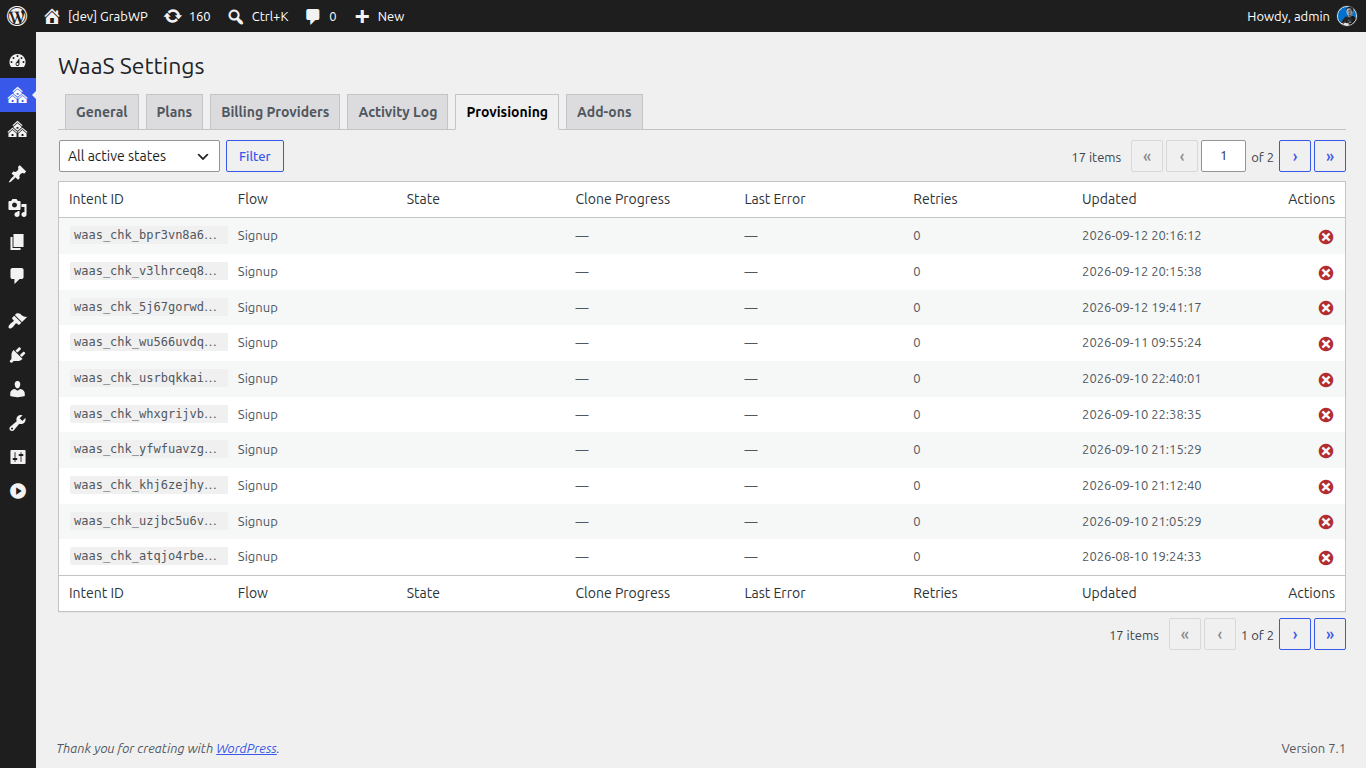
Provisioning is the part that usually breaks in homegrown WaaS builds, because a payment can succeed while site creation fails, leaving a paying customer with nothing. GrabWP WaaS treats provisioning as a durable state machine designed to survive those failure modes:
- Stale-intent recovery - if a signup intent stalls partway, the platform can pick it back up instead of stranding it.
- Retry - transient failures during tenant creation are retried rather than abandoned.
- Idempotent webhook finalization - if your billing provider sends the same webhook twice, the tenant is finalized once, never duplicated.
When provisioning completes, the platform fires email notifications and outbound webhooks so the rest of your stack can react. Emails cover signup, domain activation, payment failure, and cancellation. Webhooks fire on tenant.created, tenant.deleted, domain.added, and payment.received, which is how you connect a CRM, analytics, or an onboarding sequence without touching plugin code.
The Customer Dashboard
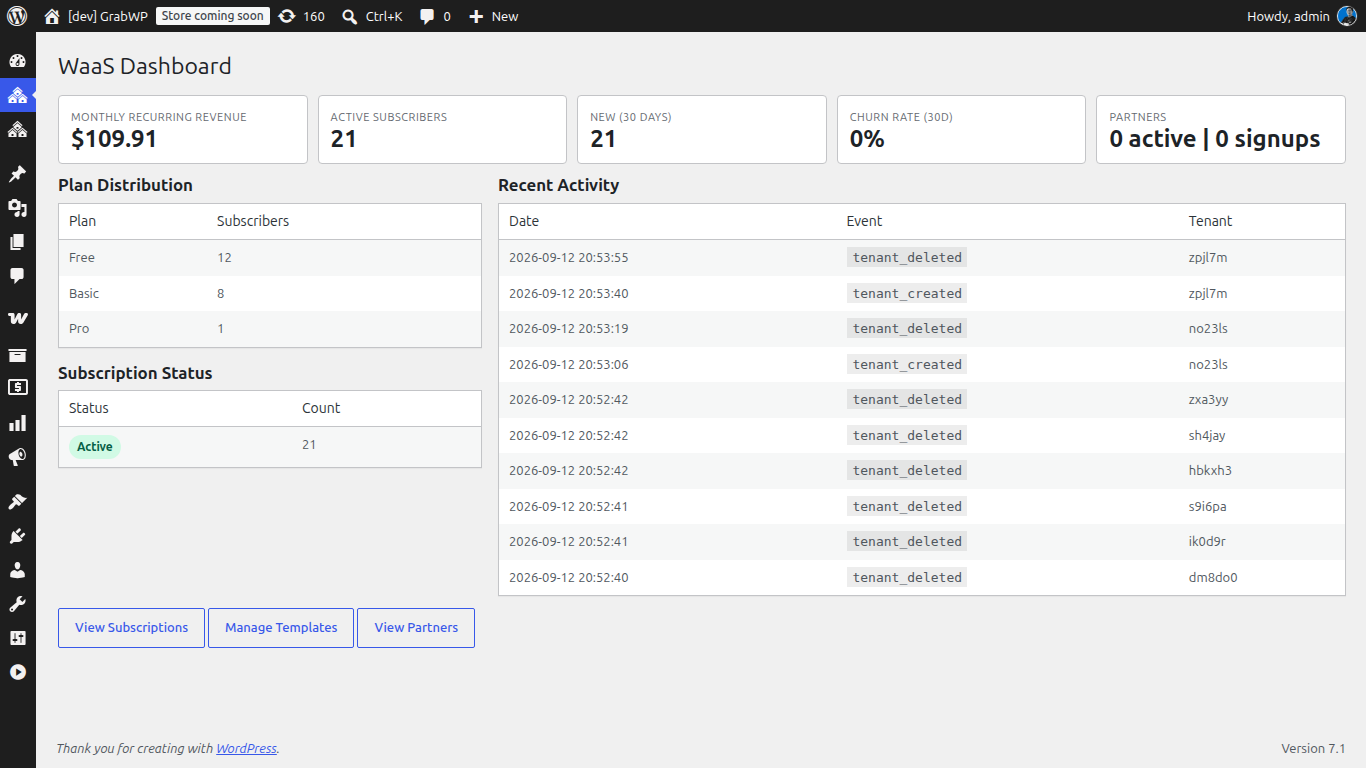
Publish another page with [grabwp_waas_dashboard] and your customers get a self-service control panel. From there they manage:
- Domains - add and activate the domain for their tenant.
- Plan - view and change their subscription tier.
- Backups - access their tenant’s backups.
- Settings and account - adjust tenant settings and manage their own account details.
Because the dashboard is self-service, most day-to-day requests that would otherwise land in your inbox are handled by the customer directly. That is the point of a WaaS: the platform does the support work that a manual service would put on you.
Going Live
Before you open signups, walk the flow yourself as a customer: complete a real signup, confirm the tenant provisions, add a domain, and check that the notification emails arrive. Use the platform admin to watch the activity log and analytics, and keep the provisioning recovery view handy in case an early signup needs a nudge.
Launch honestly. GrabWP WaaS is in guided beta, so start with a small cohort, set clear expectations, and grow as you confirm each part of the pipeline works for real customers. A tight, reliable platform for ten customers beats a shaky one advertised to a thousand.
When you are ready to build your platform, explore GrabWP WaaS and start with the free GrabWP Tenancy base plugin. Configure your plans, drop in the three shortcodes, and let the platform handle signup, payment, and provisioning while you focus on your customers.
Written by
GrabWP Team
WordPress Multi-Tenancy Experts
The GrabWP team builds and maintains the GrabWP Tenancy plugin, helping developers and agencies run scalable multi-tenant WordPress platforms. With years of experience in WordPress core, hosting infrastructure, and plugin development.
Frequently Asked Questions
- Do I need to write code to build a WordPress SaaS with GrabWP?
- No. GrabWP Tenancy WaaS is a self-service layer you configure from the WordPress admin. You pick a billing provider, define plan tiers, choose an auth mode, and place three shortcodes on pages. The signup wizard, provisioning state machine, and tenant dashboard are handled by the plugin. Developers can extend it through the REST API and outbound webhooks, but that is optional.
- Does GrabWP WaaS require WordPress Multisite?
- No. GrabWP WaaS runs on top of GrabWP Tenancy, which delivers multi-tenancy without Multisite. Each customer receives an isolated tenant that is provisioned automatically after payment, so you avoid the shared-tables model and network-admin overhead that Multisite imposes.
- What happens if provisioning fails midway through signup?
- Provisioning runs as a durable state machine with stale-intent recovery, automatic retry, and idempotent webhook finalization. If a step stalls or a webhook arrives twice, the platform reconciles the intent rather than creating a broken or duplicate tenant. The platform admin also includes a provisioning recovery view for manual inspection.
Editorial standards: Our content is written by WordPress experts with hands-on multi-tenancy experience. Articles are fact-checked and regularly updated to ensure accuracy.