Let Each WordPress Client Manage Their Own Isolated Site

Clients want to manage their own website content, but you cannot hand them a login that also exposes every other client’s site. This guide shows how to give each service client a fully isolated WordPress environment they control, while you keep oversight of the whole portfolio from one dashboard using GrabWP Tenancy Pro.
The shared-login problem
When you run client sites the ad hoc way, self-service gets risky fast. Either you keep the logins yourself and become the bottleneck for every content change, or you share access and hope no one wanders into data they should not see. On a WordPress Multisite, a network admin can cross boundaries that clients should never cross.
Service clients (a law firm, a financial consultancy, a newly formed LLC) often hold sensitive contacts and documents. They need to edit their own pages without any path to another client’s information. That requires real isolation, not a shared install with permission juggling.
Step 1: Give each client its own isolated WordPress
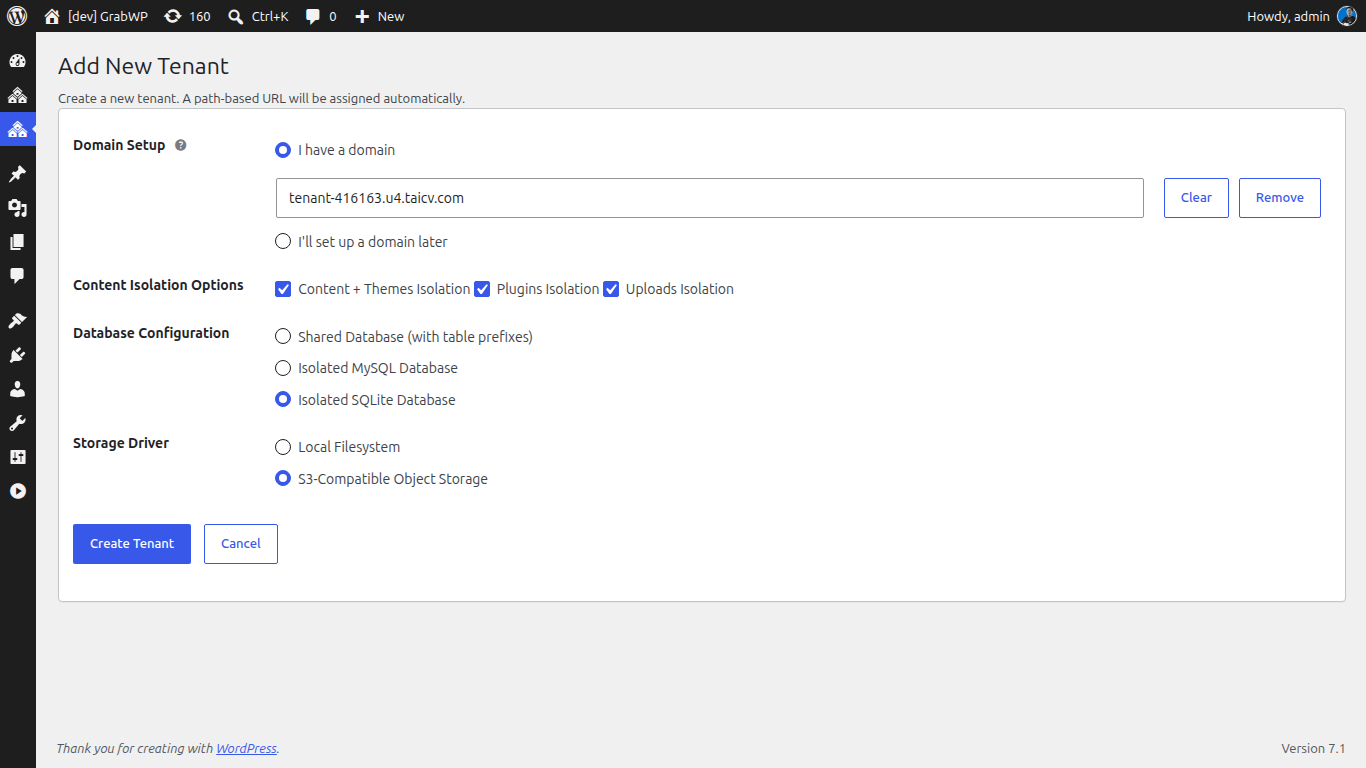
In GrabWP Tenancy Pro, each tenant is its own WordPress environment with its own login. There is no shared dashboard for clients to stumble across.
- In your main admin, go to GrabWP > Tenants and create a tenant for the client.
- Choose a dedicated database for the tenant. Pro lets each tenant run on a dedicated MySQL database or SQLite, giving complete data isolation with zero cross-tenant risk.
- Confirm the tenant has its own isolated uploads directory, so client media never lands in a shared folder.
The result is a data-isolation architecture where each client’s content, users, and files stay in their own database and their own directories. That gives you a cleaner data-handling story to tell clients who care about privacy.
Step 2: Configure each client’s plugin and theme setup
Different clients need different tools. Because Pro delivers complete wp-content separation (isolated themes and plugins per tenant), you tailor each environment without side effects on anyone else.
- Open the Extensions page to see the plugins and themes available per tenant with live status.
- Activate or deactivate plugins for that specific client, and switch their theme as needed.
- Use extension sync and the symlink-or-copy conversion to control how each tenant’s stack is installed.
One client can run an events plugin while another runs a booking system, and neither setup touches the other tenant’s directory.
Step 3: Harden each client site with per-tenant settings
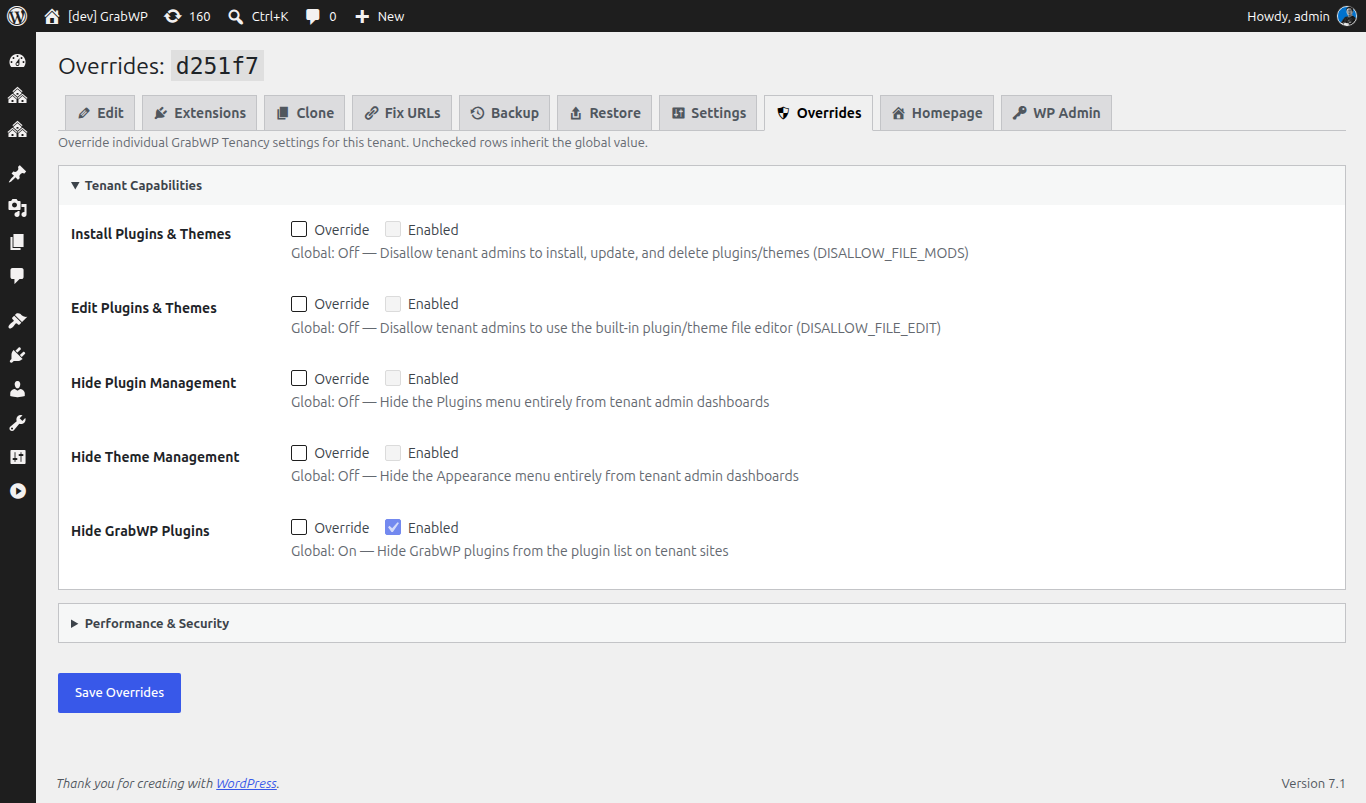
Security should be tuned per client, not left to a single server-wide setting. The base GrabWP Tenancy plugin gives you a Performance and Security tab that applies constants per tenant.
- Open the tenant’s Performance & Security settings tab.
- Set the hardening constants that fit that client, including:
DISABLE_WP_CRONto move cron off page loads- XML-RPC off to reduce a common attack surface
WP_POST_REVISIONSandEMPTY_TRASH_DAYSto control database bloatWP_HTTP_BLOCK_EXTERNALwith aWP_ACCESSIBLE_HOSTSallowlist to lock down outbound requests
- Save, and the settings apply to that tenant only.
You can lock down a cautious client tightly while leaving a more hands-on client more room, all on the same installation.
Step 4: Keep one provider dashboard over the whole portfolio
Letting clients self-serve does not mean losing control. You still run one WordPress installation, and you manage every tenant from a single provider dashboard.
- Use the tenant list to see your whole portfolio at a glance, including each tenant’s storage driver badge and content-isolation status.
- Edit tenant options inline from the main admin through the Tenant Settings page.
- Keep backups, extension control, and routing in one place while each client edits their own content in their own tenant.
Clients get the independence they asked for. You keep the oversight you need.
For turning this isolated setup into a repeatable delivery, see how to productize client site delivery with one template tenant. And when a client is ready to move on, you can hand off their site with no lock-in.
Want isolated, self-service client sites without per-site overhead? GrabWP Tenancy Pro is $9.99/month flat for your whole portfolio (annual $99.99/yr, lifetime $499.99).
Written by
GrabWP Team
WordPress Multi-Tenancy Experts
The GrabWP team builds and maintains the GrabWP Tenancy plugin, helping developers and agencies run scalable multi-tenant WordPress platforms. With years of experience in WordPress core, hosting infrastructure, and plugin development.
Frequently Asked Questions
- Can each client log in and manage only their own site?
- Yes. Every tenant is its own isolated WordPress environment with its own login. A client logs into their tenant and sees only their site, content, and users. They never see other clients' information or site structure, because tenants do not share a login or an admin.
- Is each client's data truly separated?
- Yes. GrabWP Tenancy gives each tenant isolated uploads and, with Pro, a dedicated database per tenant (dedicated MySQL or SQLite) plus complete wp-content separation. This data-isolation architecture means one client's content, contacts, and files never mix with another client's at the database level.
- Can I give different clients different plugins and themes?
- Yes. Pro provides complete wp-content separation, so each tenant gets its own isolated themes and plugins directory. You configure each client's environment independently, and the Extensions page lets you activate or deactivate plugins and switch themes per tenant with live status.
- How do I harden each client's site individually?
- The base GrabWP Tenancy plugin includes a per-tenant Performance and Security settings tab that applies constants per tenant, including DISABLE_WP_CRON, XML-RPC off, WP_POST_REVISIONS, EMPTY_TRASH_DAYS, and WP_HTTP_BLOCK_EXTERNAL with a WP_ACCESSIBLE_HOSTS allowlist. You tune these per client rather than across the whole server.
- Do I lose oversight if clients manage their own sites?
- No. You run one WordPress installation and see your full portfolio from a single provider dashboard. Clients manage their own content inside their tenant, while you keep tenant management, backups, and extension control in one place.
- How much does GrabWP Tenancy Pro cost?
- GrabWP Tenancy Pro is $9.99/month flat for your entire portfolio, with an annual plan at $99.99/yr and a lifetime license at $499.99. The price does not change as you add clients.
Editorial standards: Our content is written by WordPress experts with hands-on multi-tenancy experience. Articles are fact-checked and regularly updated to ensure accuracy. Last verified: .