Stop Losing Every Monday to Client Site Updates: One-Dashboard Maintenance

Every freelancer who manages a book of client WordPress sites knows the Monday feeling. Fifteen installs, each on its own login, each with a queue of plugin updates, a theme update, and a settings tweak a client asked for last week. You log in, update, check nothing broke, log out, repeat. By lunch you have done nothing billable and you still have five sites to go.
This guide covers the maintenance end of the client-site lifecycle: keeping every site you manage patched, backed up, and configured without visiting each one by hand. It is the natural follow-on to the starter-site clone workflow that spins new client sites up fast, and it pairs with the clean handoff workflow for when a project ends.
Why Maintenance Scales Badly
The problem is not any single update. It is that maintenance cost grows with every client you take on:
- Each site is a separate login. Fifteen clients means fifteen dashboards, fifteen sets of credentials, and fifteen chances to lose your place.
- Updates are repetitive but not safe to skip. Outdated plugins are the most common way WordPress sites get compromised, so the work cannot just be deferred.
- Backups get forgotten under pressure. The week you are busiest is the week you are most likely to update without a fresh backup, which is exactly when something breaks.
- Every new client makes it worse. Onboarding a client is a one-time win, but their maintenance is a recurring cost that never goes away.
The fix is to stop treating each client site as a separate destination and start managing them as tenants of one installation.
One Install, Every Client, One Admin
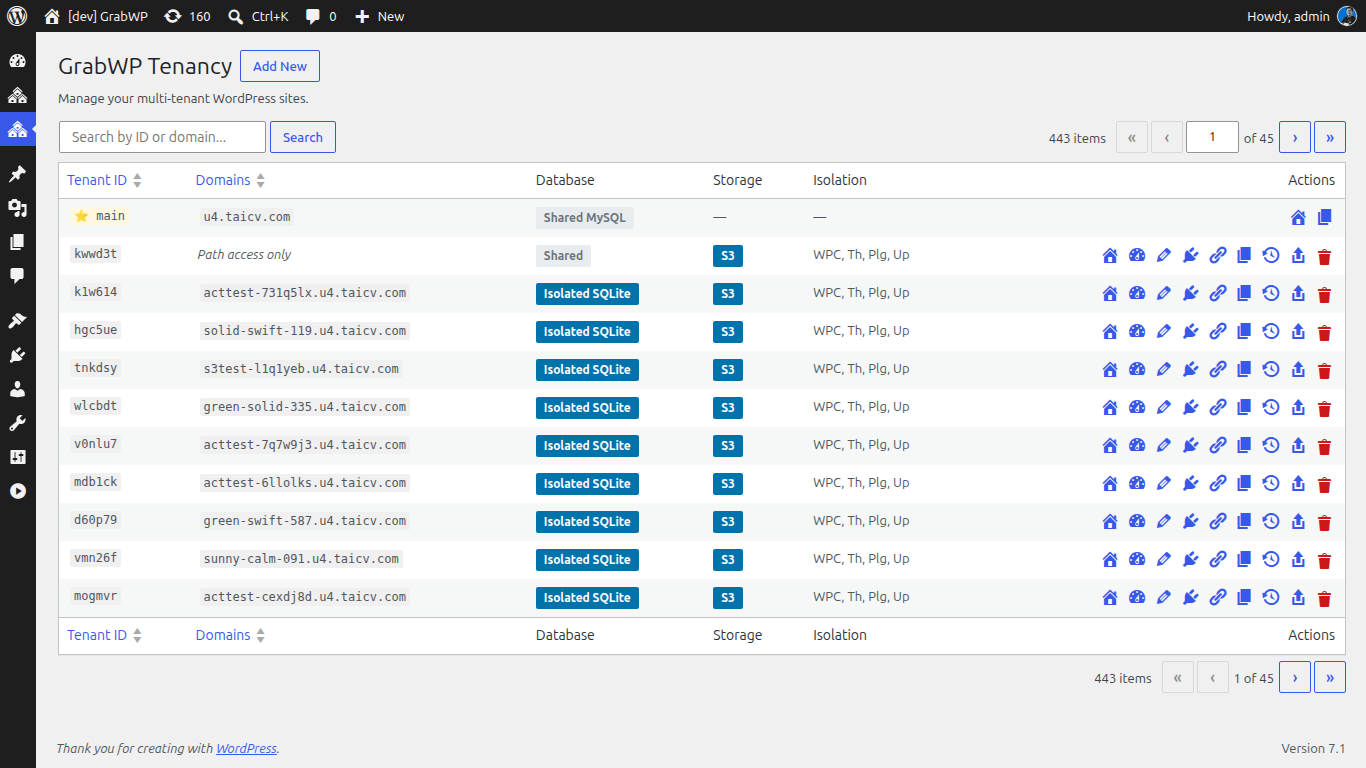
GrabWP Tenancy Pro hosts each client as an isolated tenant inside a single WordPress install. Each tenant keeps its own database, its own uploads, and, importantly for maintenance, its own isolated plugins and themes directory. That isolation is what makes central maintenance safe: you can change one client’s stack without touching the others.
Because every tenant lives under one admin, the maintenance work that used to mean fifteen logins now happens in one place.
Push plugin and theme changes from the main admin
From the Extensions page in the main admin, you activate or deactivate plugins and switch themes for a specific tenant, with live status display so you can see what is active where. Under the hood, Pro applies these changes through a signed directive queue: a file-based system that carries main-to-tenant operations such as activating a plugin, switching a theme, creating a user, or updating options, and applies them safely on the tenant side.
The practical effect is that you stop logging into each client dashboard to flip a plugin on or off. You do it from your own admin, per tenant, and the directive does the work on the client’s site.
Edit client settings inline
The Tenant Settings page lets you edit a tenant’s options inline from the main admin, using the same directive-based mechanism. When a client asks you to change a setting, you do not have to switch context into their site. You update it from the tenant view and the change is delivered to their install.
Keep per-client stacks straight
Because each tenant has fully separated wp-content, you are not forced into a lowest-common-denominator plugin set. One client can run a heavy commerce stack and another a lean marketing site, and maintaining one does not risk breaking the other. The tenant list makes it easy to see what you are managing, including a storage driver badge per tenant so you know where each site’s data lives.
Automate the Backups You Keep Forgetting
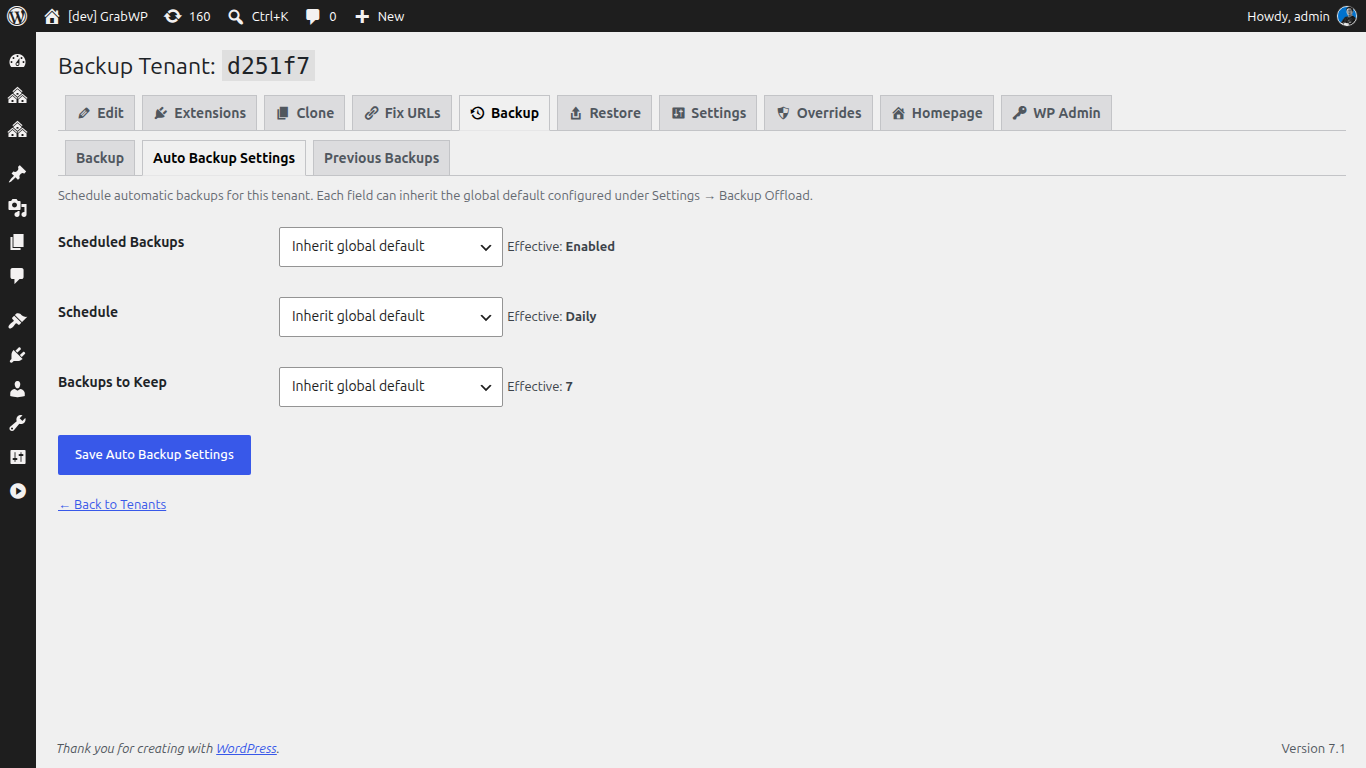
Central updates only help if you can roll back when an update misbehaves. Pro turns backups from a chore you remember into a schedule that runs itself.
Scheduled automatic tenant backups come with global defaults and per-tenant overrides for whether backups are enabled, how often they run, and how many to keep. Recurrence ranges from hourly through twice-daily, daily, weekly, fortnightly, and monthly, and old backups are pruned automatically after each successful run. When a client site needs offsite copies, auto-offload sends completed backups to configured S3-compatible storage. If you live on the command line, WP-CLI backup commands let you run a backup, configure a tenant’s schedule, check status and history, and reschedule every tenant at once.
The workflow becomes: backups run on schedule in the background, you push updates from one admin, and if something breaks you restore that one tenant without disturbing the rest.
Harden Every Site the Same Way
Consistent security across a client base is hard when each site is configured by hand. GrabWP Tenancy includes a per-tenant Performance and Security settings tab that applies constants like disabling WP-Cron, turning off XML-RPC, limiting post revisions, controlling trash emptying, and blocking external HTTP requests with an allowlist. Instead of remembering to harden each new client site individually, you apply a known-good baseline per tenant from the admin.
The Monday That Gives Time Back
Run the numbers on your own book. If maintaining fifteen client sites by hand costs you a morning a week, that is roughly fifty mornings a year spent on work no client sees as valuable. Collapsing that into one dashboard, with backups on a schedule and updates pushed per tenant, is the difference between maintenance being a tax on your week and being a few minutes of oversight.
This is the middle of the client-site lifecycle. For the front end, see how to build one starter site and clone it for every client. For the exit, see how to hand off a finished site with no lock-in. Together they let you run a full book of client sites from a single install, from first launch to final handoff.
Managing multiple client sites and tired of the per-site login grind? The Pro plan gives you per-tenant isolation, scheduled backups, and central maintenance from $9.99/month.
Written by
GrabWP Team
WordPress Multi-Tenancy Experts
The GrabWP team builds and maintains the GrabWP Tenancy plugin, helping developers and agencies run scalable multi-tenant WordPress platforms. With years of experience in WordPress core, hosting infrastructure, and plugin development.
Frequently Asked Questions
- Can I update plugins on every client site without logging into each one?
- Yes. From the main admin you activate, deactivate, and switch plugins or themes per tenant through the Extensions page, and the change is applied to that tenant through a signed directive queue. You stay in one dashboard instead of logging into each client site separately.
- Do all my client sites have to share the same plugins?
- No. In GrabWP Tenancy Pro each tenant has its own isolated plugins and themes directory, so you can maintain different stacks per client. One client can run WooCommerce while another runs a simple brochure site, and you manage both from the same admin.
- Can I schedule backups instead of remembering to run them?
- Yes. Pro supports scheduled automatic tenant backups with global defaults and per-tenant overrides for schedule and retention, on recurrences from hourly to monthly, with optional offload to S3-compatible storage after each run.
- How do I apply security hardening to every client site at once?
- GrabWP Tenancy includes a per-tenant Performance and Security settings tab that applies constants such as disabling WP-Cron, turning off XML-RPC, limiting post revisions, and blocking external HTTP with an allowlist, set per tenant from the admin.
Editorial standards: Our content is written by WordPress experts with hands-on multi-tenancy experience. Articles are fact-checked and regularly updated to ensure accuracy.