Give Marketing Clients a Clean Data-Privacy Story With Per-Client Isolation

Marketing clients increasingly ask about data. Where does our information live? Is it mixed with your other clients? If we leave, do we get it back? These are reasonable questions, and a fuzzy answer (“it’s all secure, don’t worry”) erodes trust. A precise answer, grounded in how your infrastructure is actually built, wins it.
This guide is about giving clients a clean, honest data-handling story using per-client isolation in GrabWP Tenancy Pro. To be clear up front: this is a data-isolation architecture, not a legal compliance certification. It gives you a cleaner story to tell and reduces cross-client data mixing. Whether you meet any specific regulation is a matter for your own policies and legal advice.
What clients actually ask about data handling
When a client raises data concerns, the questions usually reduce to four:
- Separation. Is our data kept apart from your other clients?
- Media. Where do our uploaded files and images live?
- Recovery. How is our data backed up, and for how long?
- Portability. If we part ways, can we take our data with us cleanly?
You can answer every one of these concretely when your platform isolates clients by design. The rest of this article maps each question to the mechanism that answers it.
Dedicated database means no cross-client mixing
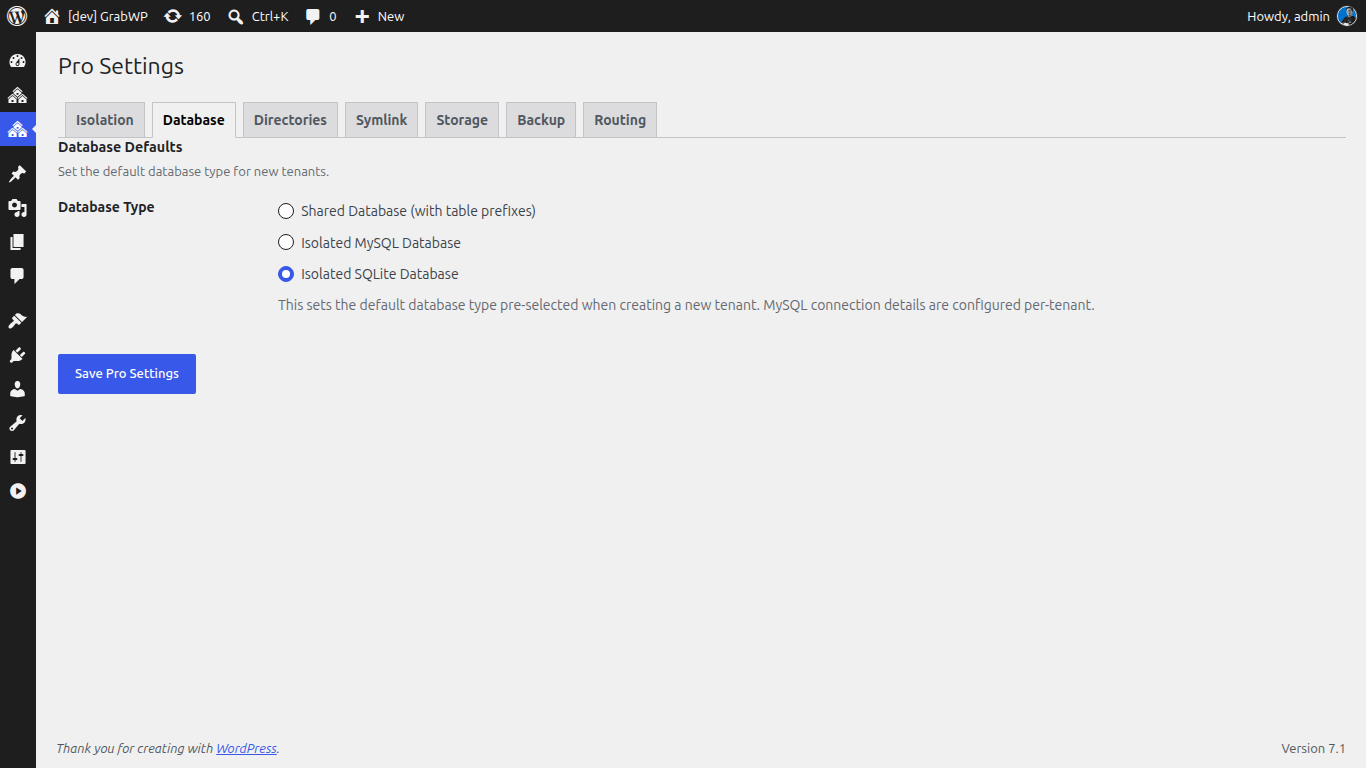
The strongest answer to “is our data kept apart” is a dedicated database per client. GrabWP Tenancy Pro offers flexible database options per tenant: shared MySQL with prefixes, a dedicated MySQL database, or SQLite.
For clients who ask about data handling, assign a dedicated database per tenant:
- When creating or cloning the client’s tenant, choose the dedicated MySQL option.
- That client’s content, users, and settings now live in a database separate from every other client.
- You can point to exactly which database holds their data, which is a far stronger statement than “it’s in there somewhere with everyone else.”
Because each client’s data sits in its own database, there is no shared-table surface where one client’s records could be read alongside another’s.
Isolated media and uploads
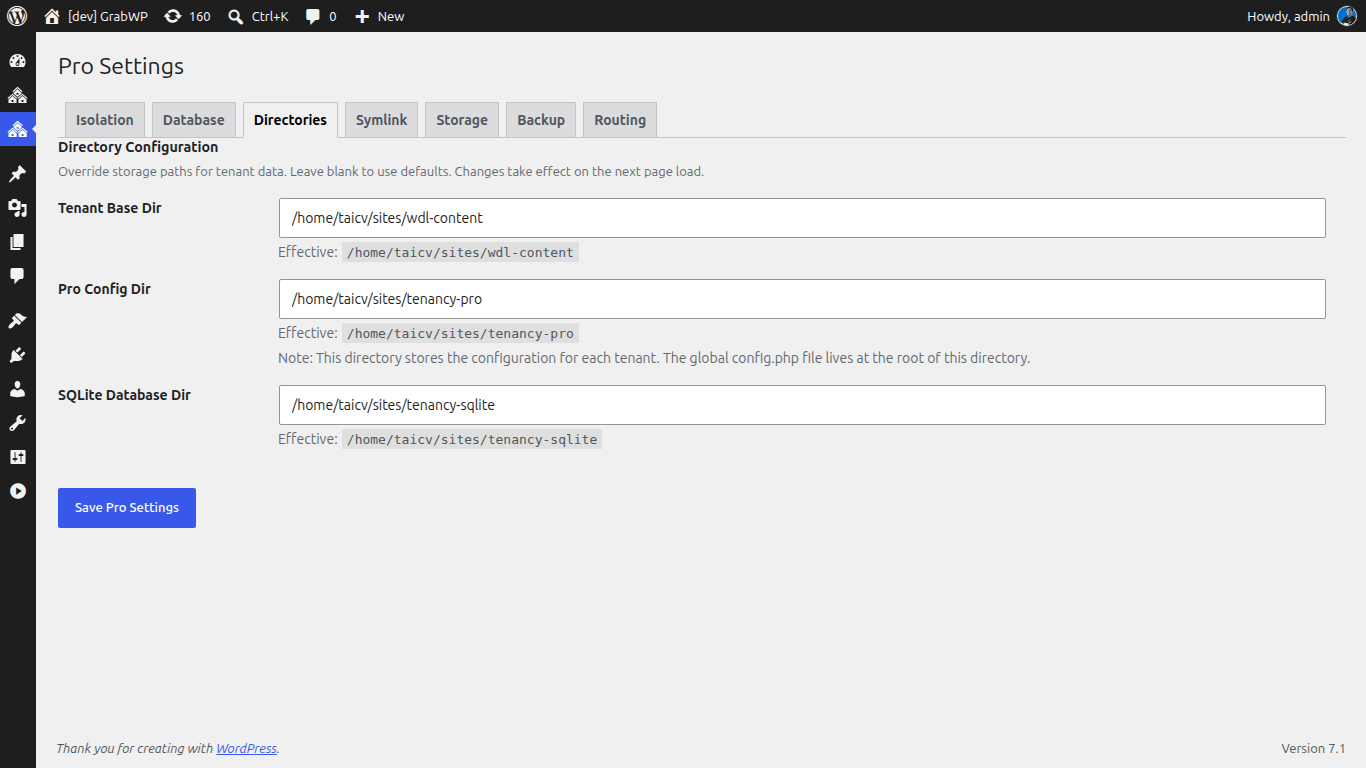
Data is not only rows in a database. It is the images, PDFs, and assets a client uploads. GrabWP Tenancy isolates uploads per tenant, so each client’s media directory is its own.
Pro extends this further:
- Complete wp-content separation gives each tenant an isolated themes and plugins directory, so the whole content surface is per client, not shared.
- S3 object storage for tenant media uses tenant-prefix isolation, so even when media is offloaded to object storage, each client’s files sit under their own prefix rather than in a common bucket path.
That lets you tell a client their files are stored separately from other clients whether they live on the server or in object storage.
Per-client backup, restore, and retention
Clients want to know their data is recoverable, and that recovery respects their boundaries. GrabWP Tenancy Pro keeps this per tenant:
- Back up a single client with a multi-step AJAX workflow and a progress UI, then list, download, delete, or restore those on-disk backups.
- Restore an individual client from its own backup, including across database types (shared MySQL, dedicated MySQL, or SQLite), without touching any other client.
- Set scheduled auto backups (hourly, twice-daily, daily, weekly, fortnightly, or monthly) with per-tenant overrides and retention, so each client’s backup history follows its own policy.
- Offload backups to S3-compatible storage when you want an off-server copy.
Per-tenant retention is the detail clients appreciate: their backup schedule and how long copies are kept can be set for them specifically, not as one blanket rule.
Portability if a client leaves
A clean data story includes a clean exit. If a client moves on, they should be able to take their data without friction, and without you having to untangle it from everyone else’s.
GrabWP Tenancy Pro supports tenant export of the database and files to migrate a tenant to standalone hosting. Because the tenant was isolated the entire time, the export is self-contained:
- Export the client’s tenant database and files.
- Hand off or migrate that package to their own standalone WordPress install.
- No other client’s data comes along, because it was never mixed in.
Being able to say “if you leave, here is your data, cleanly” turns a scary question into a selling point.
Where this fits
Per-client isolation is the same architecture that lets you run many brands on one install: see Run a Multi-Brand Client Portfolio From One WordPress Install. And when you spin up short-lived campaign sites, the same isolation keeps their data clean too, covered in Launch WordPress Campaign Microsites Fast, Without New Hosting Each Time.
GrabWP Tenancy Pro is $9.99/month (or $99.99/year, or $499.99 lifetime) for unlimited isolated client tenants on one install. See the full agency breakdown on the marketing agencies page.
Written by
GrabWP Team
WordPress Multi-Tenancy Experts
The GrabWP team builds and maintains the GrabWP Tenancy plugin, helping developers and agencies run scalable multi-tenant WordPress platforms. With years of experience in WordPress core, hosting infrastructure, and plugin development.
Frequently Asked Questions
- How do I answer a client who asks where their data lives?
- With a data-isolation architecture. In GrabWP Tenancy Pro each client is a tenant that can have its own dedicated database and its own isolated uploads directory, so you can tell a client exactly which database and media store hold their data, separate from every other client on the install.
- Does per-client isolation make you GDPR compliant?
- Isolation is an architecture, not a legal certification. Per-client databases and isolated media give you a cleaner data-handling story and reduce cross-client data mixing, but compliance with any specific regulation depends on your own policies, processing agreements, and legal advice. This article describes the technical isolation only.
- Can one client's data end up mixed with another's?
- With a dedicated database per tenant and isolated uploads per tenant, a client's content, users, and files live apart from other clients. Pro also adds complete wp-content separation, so plugins and themes do not become a shared surface between brands.
- How do backups respect per-client boundaries?
- Backups are per tenant. You back up and restore a single client from its own backup with an AJAX workflow, and scheduled auto backups support per-tenant retention so each client's backup history follows its own policy. Backups can also be offloaded to S3-compatible storage.
- What happens to a client's data if they leave?
- You can export that tenant's database and files and migrate the client to standalone hosting. Because the tenant was isolated, the export is clean and portable, so a client can take their data with them without dragging along other clients' data.
Editorial standards: Our content is written by WordPress experts with hands-on multi-tenancy experience. Articles are fact-checked and regularly updated to ensure accuracy. Last verified: .